Configuration file
Route: /backend-config (tab Configuration File)
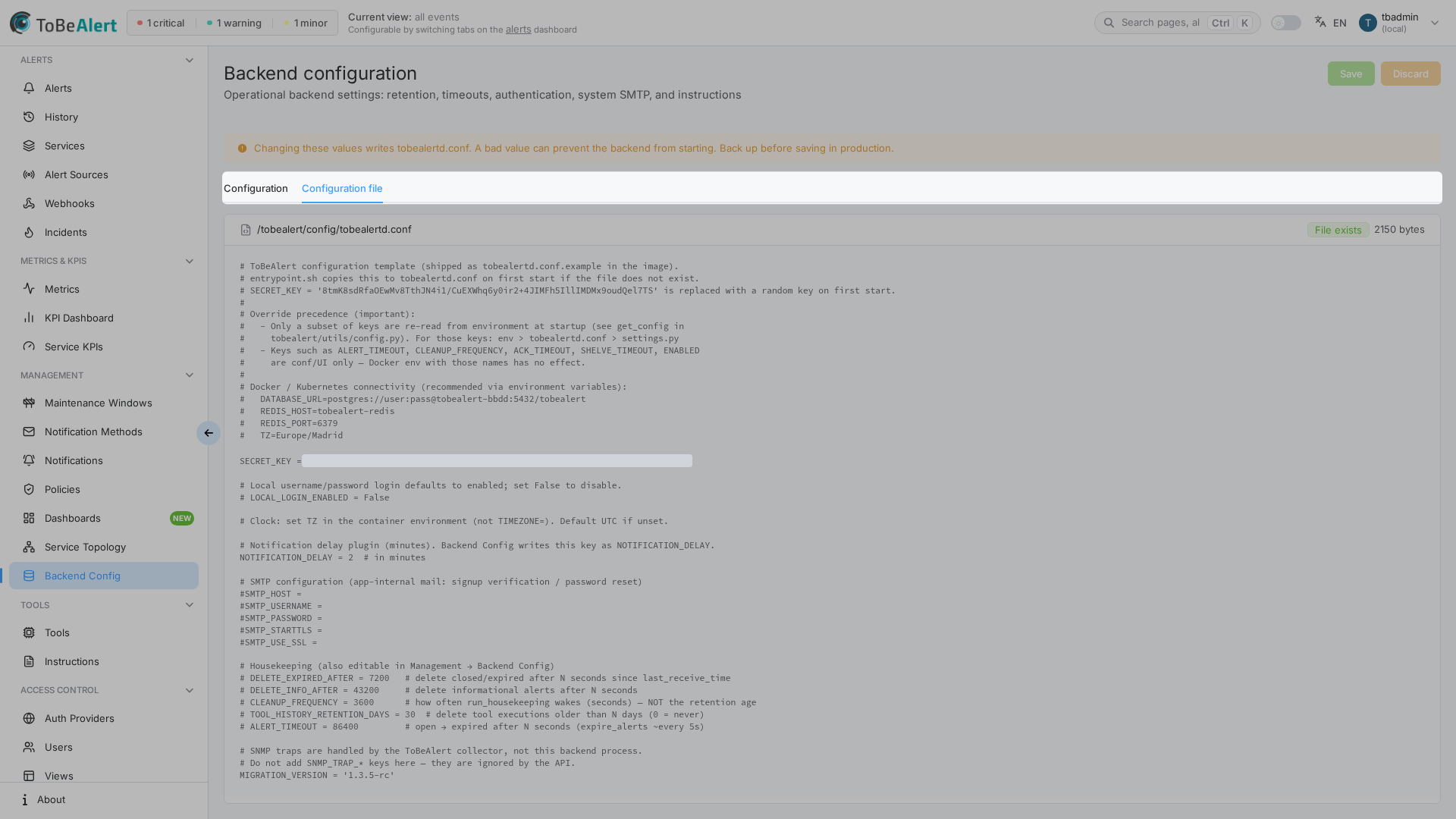
The Configuration File tab shows the raw content of the active backend configuration file on disk. Use it to verify what was written after a save on the Configuration tab, or to inspect settings that are not editable in the form.
See also: Overview · Configuration settings
What you see
| Element | Description |
|---|---|
| File path | Default display: /tobealert/config/tobealertd.conf (actual path from the server when available) |
| Content area | Full text of the file in a monospace block, or No configuration file content available |
This tab is read-only. You cannot edit the file here. To change values, use the Configuration tab and Save, or follow Settings & environment variables for manual or deployment-managed edits.
Open the Configuration File tab
- Open Management → Backend Config.
- Click the Configuration File tab.
- Wait for the path and content to load.
When to use this tab
| Scenario | Action |
|---|---|
| Confirm a Save from the Configuration tab | Open this tab and check the updated key lines |
| Troubleshoot startup failures | Compare file content with installation docs; restore from backup if corrupted |
| Find keys not in the Web UI form | Many plugin, SNMP, and integration keys exist only in the file or via env vars — see settings reference |
Relationship to other configuration
| Mechanism | Precedence | Editable here |
|---|---|---|
| Environment variables | Highest for supported keys | No |
| Configuration tab + Save | Updates file keys exposed in the UI | Indirectly (via form) |
| Manual file edit on server | Same file as shown here | Outside Web UI |
settings.py defaults | Lowest | No |
Environment variables can override values you see in the file for the running process even when the file still shows older text.
Permissions
Same as the rest of Backend Config: administrator role required. Non-admins cannot load this tab.
Best practices
- Refresh after save — switch to this tab after saving to confirm keys updated as expected.
- Keep backups of the file before major upgrades or bulk edits.
- Do not paste secrets into chat when sharing screenshots of this tab.
- Use installation docs for keys absent from the Configuration form rather than hand-editing without a backup.
- Prefer the Configuration tab for supported fields — it validates types and avoids syntax errors in Python-style assignments.