Overview
ToBeAlert records a history entry each time an alert changes — status, severity, tags, notes, tool runs, notifications, and more. Use History for troubleshooting, accountability, and compliance audits.
| Step | What you do | Menu / route | Documentation |
|---|---|---|---|
| 1 | Browse all history records | Alerts → History → /history | Alert history tracking |
| 2 | Narrow with TQL or the filters sidebar | Same list | Search and TQL · Filters sidebar |
| 3 | Select rows for export or delete | Same list | Bulk actions |
| 4 | Open a per-alert timeline | Click Alert ID or double-click a row → /history/{alertId} | Per-alert timeline |
| 5 | Inspect events and export one alert | Timeline view | Timeline events |
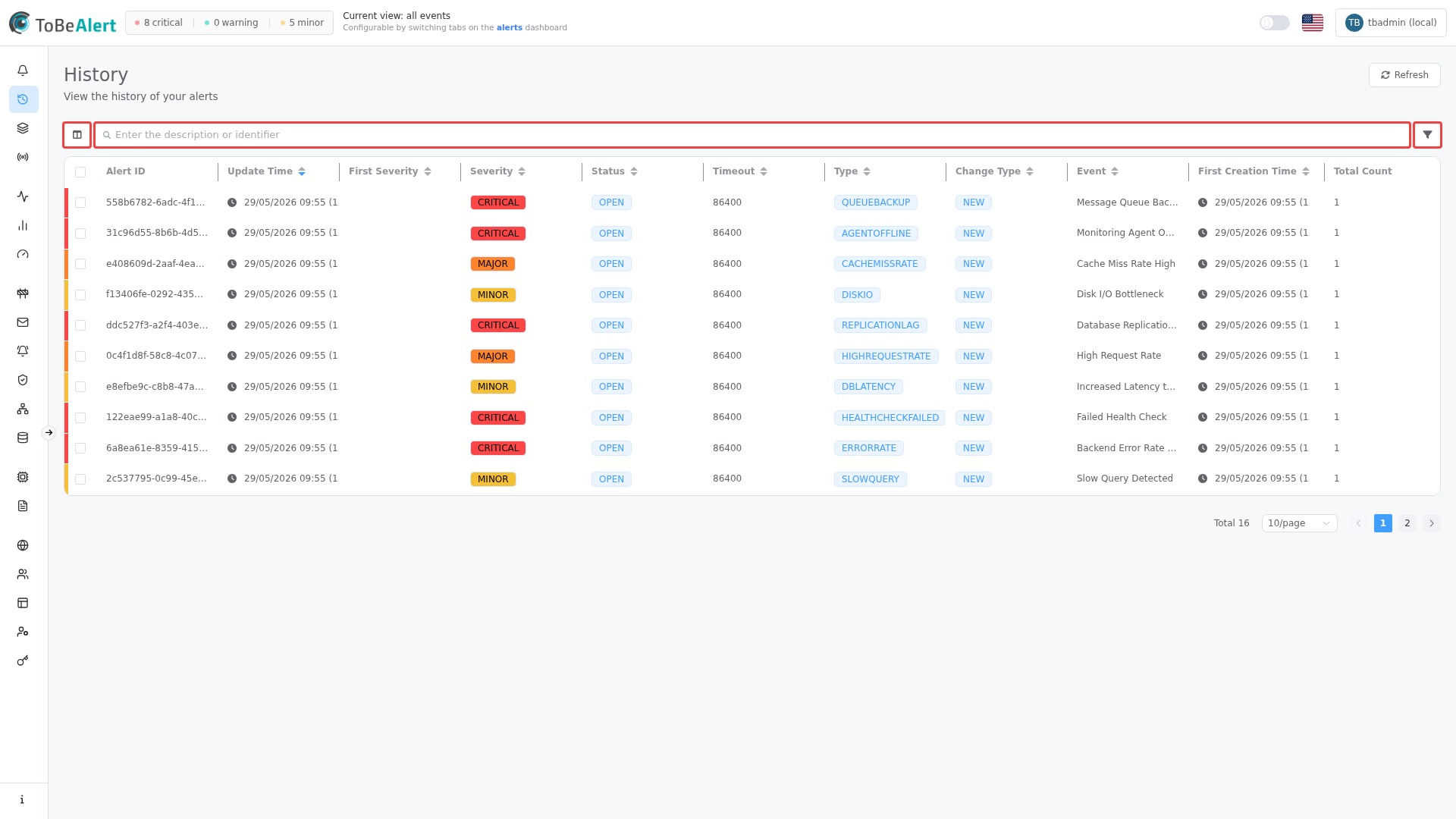
Where to find it in the UI
| Entry point | How |
|---|---|
| Sidebar | Alerts → History |
| From an alert | Right-click an alert on the dashboard for history-related actions, or open the alert drawer History tab |
| From History list | Click an Alert ID, or double-click a row, to open the per-alert timeline |
Header actions: Export (download), Refresh, and Add filter (plus icon). The page shows a hits chart above the history table. The page description reads "View the history of your alerts".
History requires the history feature in your license. If the menu item is disabled, contact your administrator.
What is tracked
Each history record captures a snapshot of the alert at a point in time, including:
| Change type (examples) | What you see |
|---|---|
| NEW | Alert first received |
| Status / severity changes | Previous and new values in the timeline |
| note_added / note_deleted | Note text |
| Tag, service, attribute updates | Added, removed, or modified values |
| notification | Notification sent (shown in the timeline) |
| Tool executions | Reflected in alert field changes |
History records include the user who performed an action when applicable — see Users and permissions.
Related modules
| Module | Relationship |
|---|---|
| TQL search and filters | Shared TQL syntax; History list is TQL-only |
| List tables and bulk actions | Shared table chrome; History export and delete on the tracking page |
| Alerts dashboard | Context menu and drawer history |
| Search (TQL) | Same column:operator:value syntax on the History list |
| Running tools on alerts | Tool runs appear in alert history |
| Notification rules | Notification sent entries in the timeline |
| Policies | Cross-check when alert fields change unexpectedly |
Best practices
See Alert history tracking — Best practices for search, export, and timeline tips.