Modifiers and tools
Route: /policies (Modifiers tab in the policy drawer)
Modifiers are the actions of a policy: changes applied to each alert that passed Conditions. You can also attach an optional custom tool to run script logic on matching alerts.
See also: Overview · Conditions · Tools overview
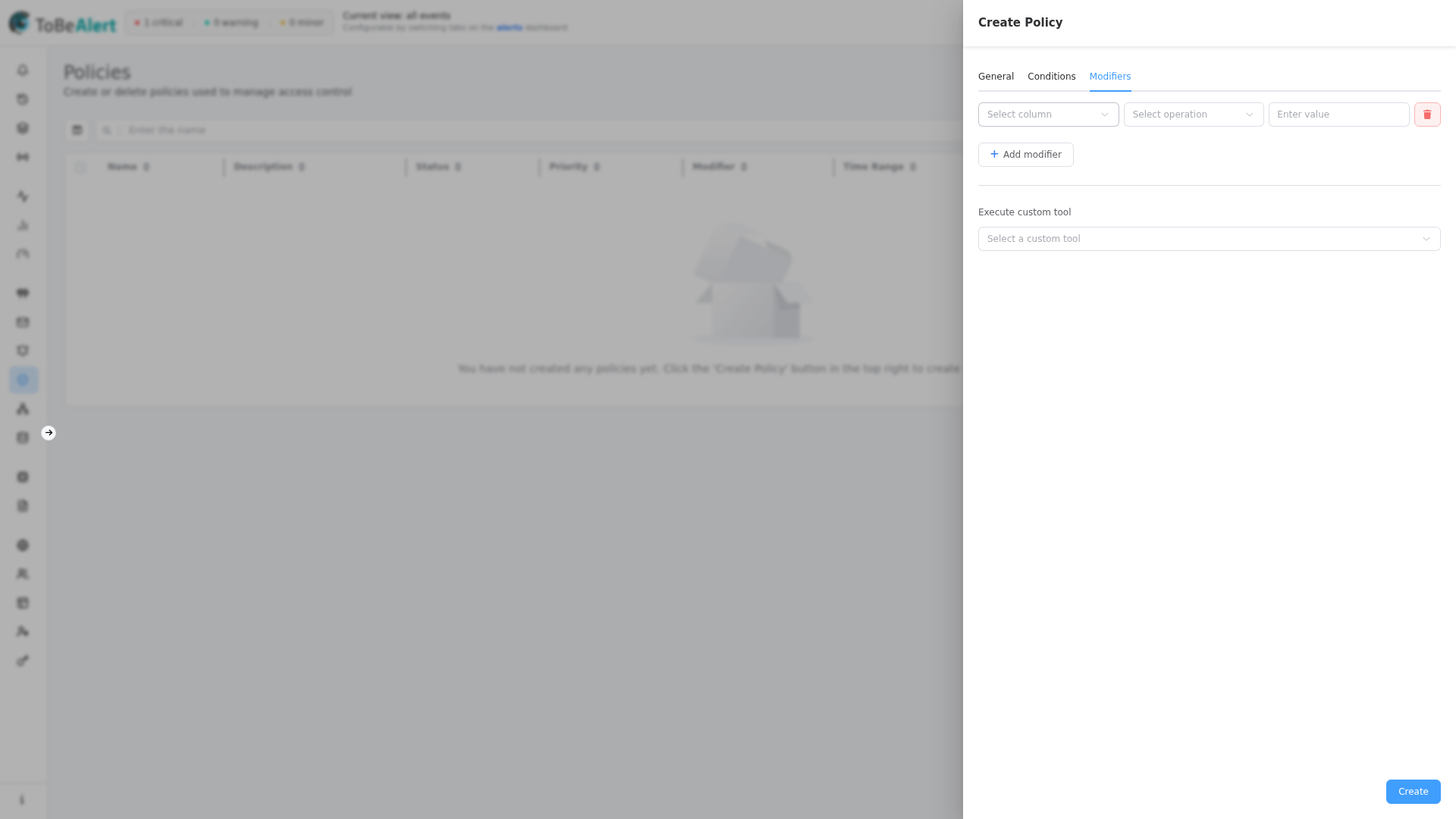
Add a modifier
- Open the Modifiers tab.
- Click Add modifier.
- For each modifier row:
- Select column — alert field to change (immutable fields such as
id,resource, andeventare excluded) - Enter attribute — only when column is
attributes - Select operation —
set,add,delete, orreplace(depends on column type) - Value — type-appropriate input (severity picker, text, date, …)
- Enter value to replace — only when operation is replace
- Select column — alert field to change (immutable fields such as
- Remove a row with the red trash button.
- Save the policy.
You can stack multiple modifiers on one policy; they apply in list order.
Operations by column type
| Column type | Available operations |
|---|---|
severity, firstSeverity, status | set only |
attributes | set, delete (no value needed for delete) |
| Text / enum fields | set, add, delete, replace |
| Number fields | set, delete |
Array fields (service, tags, …) | set, add, delete |
| Object fields | set only |
Operation meanings
| Operation | Effect |
|---|---|
| set | Replace the field value |
| add | Append to a list or combine values (where supported) |
| delete | Remove a value or clear an attribute key |
| replace | Substitute a substring/pattern — requires Enter value to replace |
Execute custom tool
At the bottom of the Modifiers tab:
| Field | Description |
|---|---|
| Execute custom tool | Dropdown: None or a registered custom tool by name |
When a tool is selected, it runs on alerts that match Conditions (in addition to applying modifiers). Tools are defined under Tools → Tools — see Tools overview.
Tools license limit
Active policies with a custom tool assigned count toward your tools license limit. When the limit is reached:
- Execute custom tool is disabled (Max items reached).
- You cannot enable an inactive policy that already has a tool assigned.
Example scenarios
Normalize severity on acknowledge
- Conditions:
statusEquals →ack - Modifier:
severityset →normal
Add ownership metadata
- Conditions:
serviceContains →billing - Modifier:
attributeskeyownerset →billing-team
Strip a temporary tag after processing
- Conditions:
tagsContains →auto-imported - Modifier:
tagsdelete →auto-imported
Enrich via script
- Modifiers:
attributesset keyenriched→true - Execute custom tool:
lookup-cmdb(example tool name)
Best practices
- Prefer modifiers for simple field updates; use custom tools for external lookups or complex logic.
- Use set on
severity/statuscarefully — test with Run to avoid hiding real incidents. - One policy per concern (tagging, severity normalization, enrichment) keeps priorities predictable.
- Leave Execute custom tool as None unless script execution is required — fewer moving parts and no tools quota impact.
- Document tool side effects in the policy Description for operators and auditors.