Modifiers and tools
Route: /policies (Modifiers tab in the policy drawer)
Modifiers are the actions of a policy: changes applied to each alert that passed Conditions. A modifier changes a field (Modify field), moves the severity up or down a number of levels (Severity step), links the alert to the alert that explains it (Mark as effect), or places the alert's resource in the resource graph (Resource relation). You can also attach an optional custom tool to run script logic on matching alerts.
See also: Overview · Conditions · Cause and effect alerts · Tools overview · Scripting reference
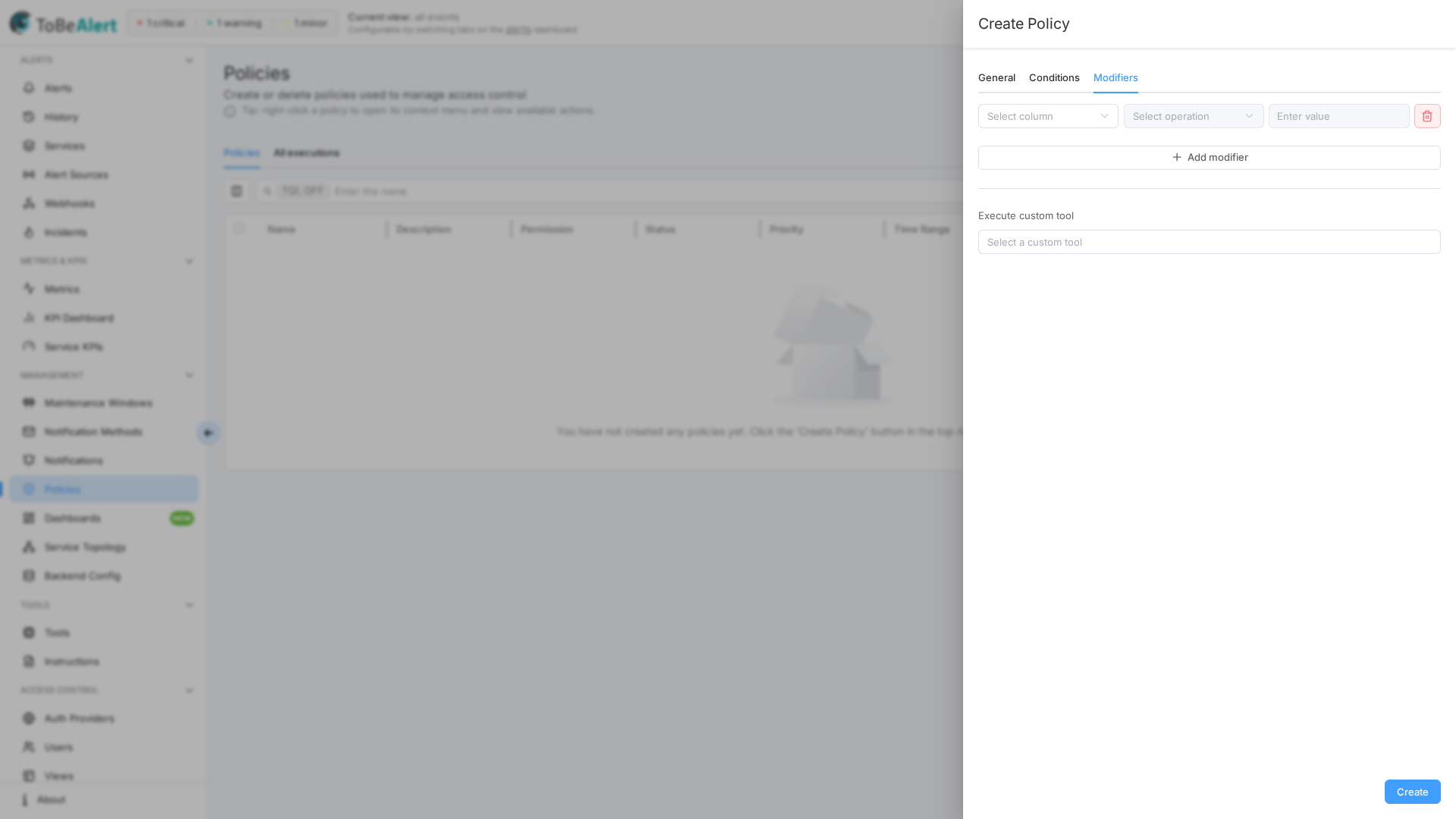
Add a modifier
- Open the Modifiers tab.
- Click Add modifier.
- For each modifier row:
- Modifier type — Modify field (default, the fields below), Severity step (see Severity step), Mark as effect (see Mark as effect), or Resource relation (see Resource relation)
- Select column — alert field to change (immutable fields such as
id,resource,event,environment,group,origin,type, and the timestamps are excluded) - Enter attribute — only when column is
attributes - Select operation —
set,add,delete,replace, or a text transform (upper,lower,capitalize,trim), depending on column type - Value — type-appropriate input (severity picker, text, date, …). Not needed for delete and the text transforms
- Enter value to replace — only when operation is replace
- Remove a row with the red trash button.
- Save the policy.
You can stack multiple modifiers on one policy; they apply in list order.
After all modifiers run, the policy applies any Extractions (regex → custom attributes), then the optional custom tool. See Creating a policy — Extractions.
Operations by column type
| Column type | Available operations |
|---|---|
severity, status | set only (to move severity by levels, use Severity step) |
attributes | set, delete, upper, lower, capitalize, trim |
| Text / enum fields | set, add, delete, replace, upper, lower, capitalize, trim |
| Number fields | set, delete |
Array fields (service, tags, …) | set, add, delete |
| Object fields | set only |
Operation meanings
| Operation | Effect |
|---|---|
| set | Replace the field value |
| add | Append to a list or combine values (where supported) |
| delete | Remove a value or clear an attribute key — no value needed |
| replace | Substitute a substring/pattern — requires Enter value to replace |
| upper / lower | Convert the current text to upper or lower case — no value needed |
| capitalize | Upper-case the first letter of every word (the rest of each word is left as it is) — no value needed |
| trim | Remove spaces at the beginning and end of the text — no value needed |
Text transforms
upper, lower, capitalize, and trim act on the current value of a text column or attribute, so the Value field is not used. They only touch text: an attribute that holds a number or a list is left unchanged. They are useful when several sources send the same thing with different spelling and you want conditions, views, and the resource graph to see one form.
Example — normalize a hostname attribute as alerts arrive:
- General: trigger On alert creation and any change type
- Modifiers:
attributeskeyhostnamelower, thentexttrim
Stored form of the modifiers:
[
  { "column": "attributes", "attribute": "hostname", "operation": "lower" },
  { "column": "text", "operation": "trim" }
]
An alert with attributes.hostname = "WEB-01.Example.COM" is stored with web-01.example.com. The Run preview lists the field with its value before and after (a change of case alone is shown too), and the alert history records the change as a Policy execution entry like any other field change. Fields that are immutable in modifiers — resource, event, environment, … — cannot be transformed; fix those at the source or use an attribute.
Severity step
Choose Modifier type → Severity step to raise or lower the severity by a number of levels instead of setting a fixed one. The step walks the severity order of the alarm model — security > critical > major > minor > warning > indeterminate > informational > normal > debug > trace > unknown (ok and cleared count as normal) — and can be capped so that the result never goes beyond a given severity.
| Field | Description |
|---|---|
| Step | Number of levels to move: positive raises (+1 = one level more severe), negative lowers (-1). Between -10 and 10, never 0 |
| Never above | Cap for the result when raising: the alert never becomes more severe than this. No limit (default) walks up to security |
| Never below | Cap for the result when lowering: the alert never becomes less severe than this. No limit (default) walks down to unknown |
Stored form of the modifier (max = Never above, min = Never below, null = No limit):
{ "type": "severityStep", "step": 1, "max": "critical", "min": null }
How it behaves:
- The caps only limit the result. An alert already at the cap, or beyond it, is left as it is — nothing is written and nothing appears in the history. Never above cannot be less severe than Never below.
- A severity that is not in the alarm model is not changed.
- A step beyond the end of the order stops at the last severity (
securitywhen raising,unknownwhen lowering). - The change is a normal severity change: the dashboard,
previousSeverity,trendIndication, and notification rules that watch severity react to it exactly as toseverityset. - The Run preview lists
severity(from → to) for every alert the step would change.
History
The alert history gets a Policy execution entry with the policy as actor and a readable reason: Policy "X" raised severity minor → major (step +1, max critical). or Policy "X" lowered severity critical → major (step -1, min warning). The caps are mentioned only when they are set.
Example: soften alerts from a test environment
- General: trigger On alert creation and any change type
- Conditions:
environmentEquals →test - Modifier type: Severity step · Step:
-1· Never below:warning
{ "type": "severityStep", "step": -1, "max": null, "min": "warning" }
A critical test alert is stored as major, a major one as minor, a minor one as warning. A warning alert (or anything less severe) is received unchanged, with no history entry.
Example: escalate alerts that stay open
- General: trigger Every x minutes →
30 - Conditions:
severityIs in →minor, majorANDopenForGreater than →1d(see Conditions — Relative time) - Modifier type: Severity step · Step:
+1· Never above:critical
{ "type": "severityStep", "step": 1, "max": "critical", "min": null }
An alert that has been minor for more than a day becomes major on the next run, critical on the run after that, and then stops: it is at Never above, so later runs change nothing. The condition is re-evaluated on every run, so alerts qualify as they age.
Mark as effect
Choose Modifier type → Mark as effect to link each alert that matches the policy Conditions (the effect) to the alert that explains it (the cause). The effect is marked Suppressed and the dashboard lists it, dimmed, under its cause. The cause is found either by conditions or by the position of the alert's resource in the resource graph (an open alert on a parent resource). Concepts, dashboard behavior, and release rules are in Cause and effect alerts.
| Field | Description |
|---|---|
| Cause is | Conditions (default): the cause is any alert that matches Cause conditions. Open alert on a parent resource: the cause is an open alert on a parent — or a higher ancestor — of the alert's resource in the resource graph. See Cause on a parent resource |
| Cause conditions | With Cause is → Conditions: which alerts may be the cause — same builder as the Conditions tab, at least one clause. Hint shown in the form: Alerts matching these conditions within the window become the cause; this alert is marked as their effect. |
| Max depth | With Cause is → Open alert on a parent resource: how many levels up the graph to look, 1–10 (default 5). 1 = the direct parent only, 2 = parent and grandparent, and so on |
| Additional cause filters (optional) | With Cause is → Open alert on a parent resource: the same builder, now optional. When set, the alert on the parent resource must also match these filters to be the cause (for example only Down events) |
| Window | Number of Units between the effect and the cause (compared on their creation times) |
| Unit | Minutes or Hours |
| Direction | Before or after — the cause may be older or newer than the effect. Only before the cause — the effect was created before the cause; an effect created after it does not qualify. Only after the cause — the effect was created after the cause; an effect created before it does not qualify |
How the link is made:
- The modifier runs when an alert is received and when you Run the policy by hand.
- Both orders are covered. If the effect arrives and a matching cause already exists inside the window, it is linked at once. If the effect arrived first, it is linked when the cause arrives (alerts that match Conditions, are still without a cause, and fit the window are attached to the new cause).
- Only alerts that are still alerts count as causes: closed, expired, and deleted alerts are ignored. An alert that is itself an effect cannot be a cause (one level only).
- When several causes qualify, the one closest in time to the effect wins (with Open alert on a parent resource, the nearest ancestor first — see below).
- A repeat of an existing alert (same resource, event, and environment) does not change the link or the flag.
An alert that already has a cause keeps it, even when a new cause that fits the window better arrives later and even if you Run the policy again. To move an effect under another cause, release it first — close or delete its current cause, or run a policy with suppressed set → false and causeId delete (see Suppress and un-suppress with Modify field) — then receive the alert again.
Use realistic windows (minutes to a few hours). With a very wide window, any old cause that is still open captures every new effect, and because effects are never moved, the link stays wrong until that cause is closed.
Cause on a parent resource
With Cause is → Open alert on a parent resource, the policy does not need to know which event explains which: it uses the resource graph. The graph is fed by alert payloads (resourceParent / resourceChildren), the graph API, and the Resource relation modifier.
- Candidates. Open alerts — not closed, expired, or deleted, and not already effects — whose resource is an ancestor of the effect's resource in the graph, in the same environment, up to Max depth levels, and inside the Window / Direction. The
resourceParentthe alert itself declares counts as its parent even when the graph has no relation for it yet. - Choice. The nearest ancestor wins (an alert on the parent before one on the grandparent); at the same distance, the one closest in time. Additional cause filters narrow the candidates further.
- Cause arrival. When an alert arrives on a resource that has children in the graph (or open alerts that declare it as parent), the open alerts on its descendants — up to Max depth — that match the policy Conditions and fit the window are linked to it as effects. With Additional cause filters, the arriving alert must match them.
- One level, flattened. The one-level rule still holds. If the alert on the intermediate resource is itself already an effect, it cannot be a cause, so the alert on the child resource is linked to the root cause instead of forming a chain.
- Release works as for any effect: when the cause is closed, expired, cleared, or deleted, the effect is released.
Example: everything on a host behind a host outage
The graph knows vm-7 → esx-01 → cluster-a (declared by the host alert's resourceChildren, by the API, or by a Resource relation modifier).
- Conditions:
eventEquals →ServiceUnavailable - Modifier type: Mark as effect · Cause is: Open alert on a parent resource · Max depth:
2 - Additional cause filters:
eventEquals →HostDown - Window:
15· Unit: Minutes · Direction: Before or after
Stored form of the modifier (causeConditions holds the optional filters, same JSON as Conditions; omit it when there are none):
{ "type": "markAsEffect", "causeSource": "parentResource", "maxDepth": 2, "window": 15, "unit": "minutes", "direction": "both" }
esx-01 HostDown arrives and, two minutes later, vm-7 ServiceUnavailable in the same environment. The policy walks up from vm-7, finds the open HostDown on its parent esx-01 inside the window, and links vm-7 as a suppressed effect of it. Had ServiceUnavailable arrived first, it would have been linked when HostDown arrived on the parent. With Cause is → Conditions this policy would need one cause condition per host event; with the parent resource it covers every host and every virtual machine the graph knows.
History
The effect's alert history gets a Policy execution entry with the policy as actor and a readable reason: Policy "X" marked this alert as an effect (suppressed): alert <id> (<resource> <event>) matched the cause conditions. With Open alert on a parent resource the reason reads … alert <id> (<resource> <event>) is an open alert on a parent resource "esx-01". or, when the cause arrived after the effect, … arrived on a parent resource "esx-01". The diff shows suppressed: false → true and causeId: — → <id>. When the sender posted the alert with its cause already set, there is no policy entry.
Suppress and un-suppress with Modify field
The classic Modify field modifier works on the flag too:
| Goal | Modifier |
|---|---|
| Show an effect again (it keeps its Cause) | suppressed set → false |
| Dim an alert without linking it to a cause | suppressed set → true |
| Detach an effect from its cause | causeId (Cause) delete — leaves Cause empty; the former cause's Effects count goes down by itself. The form requires a Value for this operation, but it is ignored |
To un-suppress and release an effect in one go, put both rows on the same policy: suppressed set → false and causeId delete. This works when you Run the policy by hand on existing alerts and when new alerts are received; a repeat of an existing alert (same resource, event, and environment) does not apply it. Once released, the alert can be linked to another cause the next time it is received.
Example: application alerts behind a database outage
- Conditions:
eventEquals →AppUnavailable - Modifier type: Mark as effect
- Cause conditions:
eventEquals →DatabaseDown - Window:
30· Unit: Minutes · Direction: Before or after
When db-prod-01 DatabaseDown and jboss-01 AppUnavailable arrive within 30 minutes of each other (in either order), jboss-01 becomes a suppressed effect of db-prod-01. When DatabaseDown is closed, jboss-01 is released and shown again. Test payloads are in Sending alerts — Cause and effect.
Resource relation
Choose Modifier type → Resource relation to place the alert's resource in the resource graph: the modifier sets the alert's parent resource (resourceParent) and can declare resources that hang from it. It works inside the alert's environment — relations are stored and looked up for the alert's environment and resource, exactly like the ones a sender declares in the payload (see Sending alerts — Resource relations).
| Field | Description |
|---|---|
| Source | Where the parent comes from: Value (typed in the form, placeholders allowed), Topology (the parent that a service topology recorded in the graph), or Graph (the main parent already in the graph, whoever declared it). See Sources |
| Parent | Value only. Name of the parent resource; the field shows a hint with the available placeholders. Leave it empty to add children only |
| Children | Value only. Resources that hang from the alert's resource — type a name and press Enter to add it (placeholders allowed) |
| Overwrite existing parent | Off (default): the parent is set only when the alert has no resourceParent yet. On: the parent found by the modifier replaces the one on the alert. The switch does not affect Children — they are relations in the graph, not a field of the alert, and are always added |
| Topology | Topology only. Auto (default) accepts the parent recorded by any service topology; pick one topology to use only the parent it recorded |
Sources
| Source | Parent | Writes the graph |
|---|---|---|
| Value | The Parent field once placeholders are resolved | Yes. The parent relation (when the modifier sets it on the alert) and every child are stored with source policy; the relation's sourceRef is the policy ID |
| Topology | The parent that a service topology left in the graph for this resource (relations with source topology). Auto takes any topology; a specific topology only the parent it recorded. With several candidates, the first one in alphabetical order. A resource that is in no topology gets nothing | No |
| Graph | The resource's main parent in the graph, whoever declared it: the highest-ranked source wins (manual > event > cmdb > topology > policy), then the most recently updated relation, then alphabetical order. A resource without parents in the graph gets nothing | No |
Topology reads the relations that service topologies leave in the resource graph: every time a topology is saved in the graph editor (or through the API), each resource → resource edge becomes a relation with source topology, and relations of edges that were removed disappear. A resource that is in no saved topology, or that hangs directly from an environment node, has no topology parent — pair this source with a Graph row as a fallback (see Overwrite and fallback chains).
Placeholders
Parent and Children (source Value) accept text mixed with placeholders, replaced with values of the alert being processed:
| Placeholder | Replaced with |
|---|---|
%resource%, %environment%, %event%, %origin%, %resourceParent%, … | Any alert column, written in camelCase as in the API |
%attributes.<key>% | A custom attribute of the alert — for example %attributes.cluster% |
An unknown or empty placeholder is replaced with nothing, and a value that ends up empty is skipped. A value equal to the alert's own resource is ignored (a resource is never its own parent or child); a child listed twice is stored once.
Overwrite and fallback chains
With Overwrite existing parent off, the modifier only fills an empty resourceParent: it never replaces a parent sent by the monitoring system or set by an earlier modifier of the same policy. Because modifiers apply in list order, two Resource relation rows behave as a fallback chain — the first one that finds a parent sets it, and the next one finds the field filled and does nothing. The usual pair is Topology first and Graph second: use the topology when the resource belongs to one, otherwise whatever the graph already knows.
Turn the switch on when the policy must be the authority on the parent (for example a policy fed from a CMDB attribute that corrects what the agents send). Children are added in every case.
Where it runs
- On alert creation and any change type: the parent is set before the alert is stored, and the relations reach the graph when the alert is saved — a rejected alert (validation error, blacklist,
alert.reject) leaves nothing behind. - Scheduled triggers and manual Run: the alert is updated and the relations are written on each run.
- The Run preview lists
resourceParent(from → to) and theresourceChildrenthat would be added, without writing the alert or the graph.
History
The alert history gets a Policy execution entry with the policy as actor and a readable reason: Policy "X" set resource parent "cluster-a" (from value) and added 2 child relation(s). The origin reads from value, from the service topology, from topology <id>, or from the resource graph; a modifier that only added children says so. When nothing changes — the alert already has a parent and the switch is off, or no parent was found — there is no entry.
Example: parent from a cluster attribute
Hypervisor alerts arrive with a custom attribute cluster that names the cluster the host belongs to.
- Conditions:
eventEquals →HostNotResponding - Modifier type: Resource relation · Source: Value · Parent:
%attributes.cluster%· Overwrite existing parent: off
Stored form of the modifier:
{ "type": "resourceRelation", "source": "value", "parent": "%attributes.cluster%", "overwrite": false }
An alert for esx-01 with attributes.cluster = cluster-a and no resourceParent gets resourceParent: "cluster-a", and the graph stores esx-01 → cluster-a with source policy. An alert that already carries a resourceParent keeps it. To declare the host's virtual machines at the same time, add them under Children — for example %attributes.primaryVm% and vm-standby — which are stored as policy relations too:
{ "type": "resourceRelation", "source": "value", "parent": "%attributes.cluster%", "children": ["%attributes.primaryVm%", "vm-standby"], "overwrite": false }
Example: parent from the topology, then from the graph
Two rows on the same policy, in this order:
- Resource relation · Source: Topology · Topology: Auto
- Resource relation · Source: Graph
Stored form:
[
  { "type": "resourceRelation", "source": "topology", "topology": "auto" },
  { "type": "resourceRelation", "source": "graph" }
]
Row 1 sets the parent recorded by a service topology; when the resource is in no topology (or the alert already has a parent), row 2 takes the main parent from the graph — for example one loaded from a CMDB or declared by an earlier event. Neither row writes relations; they only fill resourceParent so that the alert can be grouped and so that Mark as effect can find a cause on the parent resource (see Cause on a parent resource).
Execute custom tool
At the bottom of the Modifiers tab:
| Field | Description |
|---|---|
| Execute custom tool | Dropdown: None or a registered custom tool by name |
When a tool is selected, it runs on alerts that match Conditions (after modifiers and extractions). Tools are defined under Tools → Tools — see Tools overview. Script helpers (Ok, Err, alert.reject) are documented in Scripting reference.
On a policy whose trigger is On alert creation and any change type, alert.reject(...) in the tool aborts ingest: the incoming alert is not created, deduplication and correlation do not run, later policies do not run, and the sender receives HTTP 403. Mutations on alert before reject are discarded. Err(...) in the same tool does not abort intake.
On scheduled / recurring policies, alert.reject(...) records a rejected tool run only. It does not delete or close existing alerts.
Active policies with a custom tool assigned count toward your tools license limit. When the limit is reached:
- Execute custom tool is disabled (Max items reached).
- You cannot enable an inactive policy that already has a tool assigned.
Example scenarios
Normalize severity on acknowledge
- Conditions:
statusEquals →ack - Modifier:
severityset →normal
Add ownership metadata
- Conditions:
serviceContains →billing - Modifier:
attributeskeyownerset →billing-team
Strip a temporary tag after processing
- Conditions:
tagsContains →auto-imported - Modifier:
tagsdelete →auto-imported
Enrich via script
- Modifiers:
attributesset keyenriched→true - Execute custom tool:
lookup-cmdb(example tool name)
Normalize text sent by several sources
- Conditions:
originIs in →zabbix, nagios - Modifiers:
attributeskeydatacenterupper,texttrim
See Text transforms.
Raise severity when a metric crosses a threshold
- Conditions:
eventEquals →Low disk spaceANDvalueGreater than →80%(see Conditions — Numeric comparisons on text values) - Modifier:
severityset →critical
Best practices
- Prefer modifiers for simple field updates; use custom tools for external lookups or complex logic.
- For Mark as effect, keep Cause conditions narrow (root problems only) and the Window short — an effect is never moved to a later, better cause.
- Prefer Cause is → Open alert on a parent resource when your alerts (or a CMDB) already describe the hierarchy: one policy covers every host, cluster, or application the resource graph knows. Keep Max depth low (
1–3) so a symptom is not parked under a distant ancestor. - Use Resource relation with Overwrite existing parent off to fill in what the sender did not say, and chain Topology → Graph rows as a fallback. Turn the switch on only when the policy is the authority on the parent.
- Use set on
severity/statuscarefully — test with Run to avoid hiding real incidents. Prefer Severity step with Never above / Never below when the policy should adjust severity relative to what the source sent rather than impose one value. - Use the text transforms (lower, trim, …) on attributes that feed conditions, views, or the resource graph, so one spelling reaches every rule.
- One policy per concern (tagging, severity normalization, enrichment) keeps priorities predictable.
- Leave Execute custom tool as None unless script execution is required — fewer moving parts and no tools quota impact.
- Document tool side effects in the policy Description for operators and auditors.