Overview
Dashboards (Management) are custom canvases: a grid of panels for service health, alerts, incidents, charts, notes, and embeds. They are not the alerts dashboard (/dash), which is the live alerts table.
| Step | What you do | Menu / route | Documentation |
|---|---|---|---|
| 1 | Create a dashboard (name, visibility) | Management → Dashboards → /dashboards | Managing dashboards |
| 2 | Edit the layout — add panels, variables, settings | /dashboards/<id> | Editing a dashboard |
| 3 | Share an open or authenticated link, or keep it management-only | Dashboard settings → Visibility | Managing dashboards |
| 4 | Playlists — cycle dashboards in kiosk mode | Playlists on the list page → /playlists | Playlists |
Where to find it in the UI
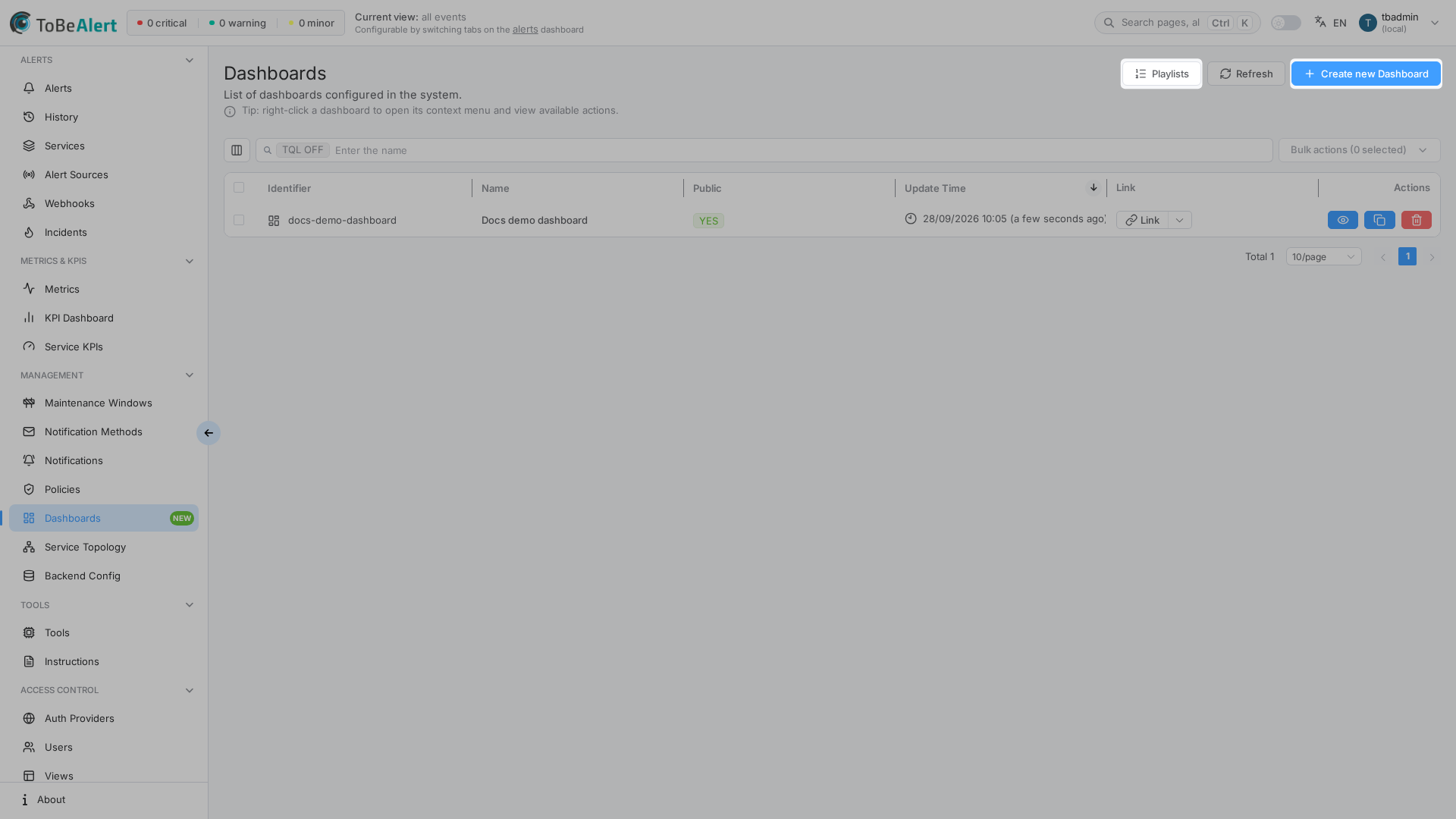
In the sidebar under Management:
- Dashboards —
/dashboards(list) - Opening a row or View —
/dashboards/<id>(editor) - Playlists — header button on the list (not a separate sidebar item) —
/playlists - Public viewer (no app chrome) —
/dashboard/<name-slug>when visibility allows - Public playlist player —
/playlist/<slug>when every dashboard in the playlist is shareable
On the list: Playlists, Refresh, and Create new Dashboard. The table uses the shared search / TQL and bulk chrome — see TQL search and filters and List tables and bulk actions.
Opening Dashboards and editing layouts require dashboard permissions in your organization. Playlists is a separate permission: the Playlists button is hidden if you cannot list playlists. Public pages can be opened without those menu items when visibility is Open public link. If Create new Dashboard or Playlists is missing, contact your administrator. See Permissions reference — Dashboards and Playlists.
How dashboards fit in ToBeAlert
Typical status-page example:
- Create Docs demo dashboard, set visibility to Open public link.
- In the editor, add Services overview, Alert viewer, and Status notes.
- Copy Link from the list (or Copy link in the editor) and share
/dashboard/…. - Optionally add the dashboard to a Playlist for a wall display.
Related but different screens:
| Screen | Route | Role |
|---|---|---|
| Alerts dashboard | /dash | Triage the alerts table |
| KPI Dashboard | /kpi-dashboard | Service KPI uptime cards |
| Service topology | /service-topology | Dependency graph (also available as a panel type) |
Related modules
| Module | Relationship |
|---|---|
| Services | Service-aware panels read catalog / topology services |
| Incidents | Recent incidents panel |
| Service topology | Service topology panel |
| Users, roles and permissions | Who can open, edit, or play dashboards |
Best practices
- Use a clear name — it appears in the public URL.
- Prefer Authenticated users only for internal walls; use Open public link only when the layout is safe to expose.
- Save the layout after adding panels; leaving edit mode without save discards changes.
- Keep playlists to dashboards you already share the same way (all public, or all private).