Heartbeats
Route: /heartbeats (sidebar: Alerts → Heartbeats)
A heartbeat is a periodic "I am still alive" signal sent by a monitored system: a script, a cron job, a backup, or another monitoring tool. ToBeAlert records when each heartbeat was last received and raises an alert when it stops arriving.
Heartbeats cover the case a normal alert cannot: a system that is down cannot report that it is down. With a heartbeat, the silence is the alert.
Heartbeats were turned off in 1.1 because of problems and are available again from 1.4.7.
See also: Heartbeats API · Sending alerts · Webhook Configurations · List tables and bulk actions
When to use a heartbeat
| Use a heartbeat when… | Example |
|---|---|
| A job must run on a schedule and nobody notices when it does not | Nightly backup, ETL load, certificate renewal |
| A host or agent can die without sending anything | Edge server, remote collector |
| Another monitoring tool must be watched | "Is my Nagios / Zabbix still sending?" |
Use a normal alert when the system itself detects and reports a problem (disk full, service error). Use a heartbeat when the problem is that nothing arrives.
How it works
Each heartbeat is identified by its origin (for example nightly-backup). Sending a heartbeat with the same origin again updates the same heartbeat and counts as a new receive.
Statuses
| Status | When |
|---|---|
| OK | The last heartbeat arrived within the timeout and on time |
| Expired | The time since the last receive is longer than the heartbeat Timeout (seconds; default 86400 = 24 hours) |
| Slow | The last heartbeat took longer than Max latency (milliseconds; default 2000) to arrive: the time between when the sender created it and when ToBeAlert received it |
Slow is only detected when the sender includes its own creation time in the heartbeat; without it the latency is always 0. The defaults are set by the administrator under Management → Backend Config (Heartbeat timeout, Heartbeat max latency) and can be changed per heartbeat.
Alerts generated
ToBeAlert checks every heartbeat every 60 seconds and acts only when the status changes:
| Change | Alert event | Severity |
|---|---|---|
| Becomes Expired | HeartbeatFail | The heartbeat's Severity (default major) |
| Becomes Slow | HeartbeatSlow | warning |
| Back to OK | HeartbeatOK | normal — closes the alert |
- There is one alert per heartbeat: the three events are correlated, so a heartbeat that fails, recovers, and fails again updates the same alert instead of creating new ones.
- The alert's Resource is the heartbeat origin, its Origin is
tobealert/heartbeat-monitorand its Type isheartbeatAlert. Environment, Service, Group, and Text come from the heartbeat. - The alerts go through the normal flow: policies, maintenance windows, and notification rules apply to them as to any other alert. To be notified, create a notification rule that matches, for example, origin
tobealert/heartbeat-monitor. - A new heartbeat does not alert until its timeout has passed without a new receive.
- Recovery is automatic: when the system sends a heartbeat again, the
HeartbeatOKalert closes the open one. - Deleting a heartbeat does not touch its alert; close or delete the alert from the alerts dashboard if needed.
Where to find it
- Sidebar: Alerts → Heartbeats (next to Webhooks)
- Direct link to a heartbeat's editor:
/heartbeats?edit=<id>(thehrefthe API returns for each heartbeat)
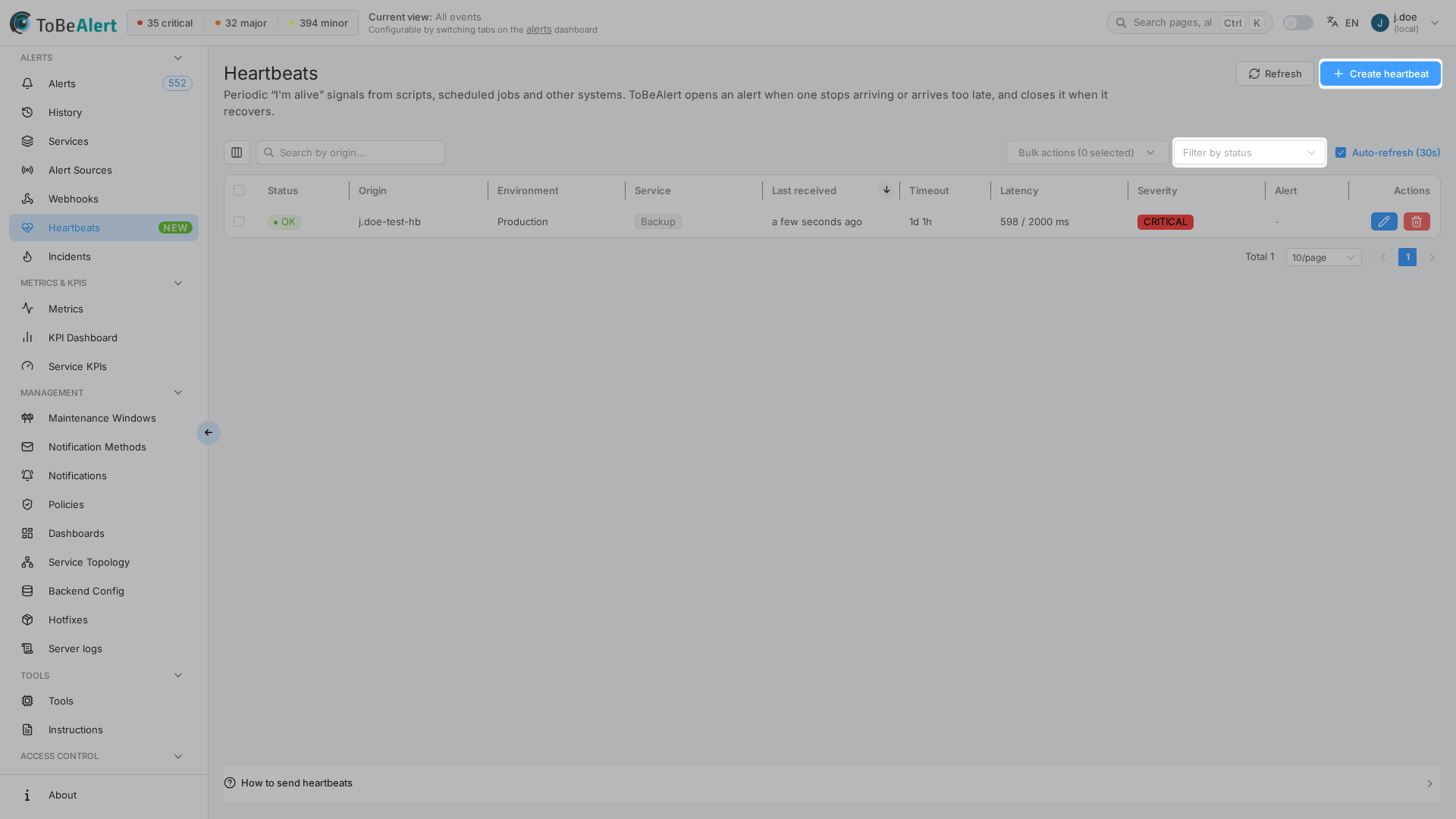
The heartbeat list
| Column | Shows |
|---|---|
| Status | OK (green), Slow (yellow), or Expired (red) |
| Origin | Name of the heartbeat. Click it to open the editor |
| Environment / Service | Where the generated alert goes |
| Last received | How long ago the last heartbeat arrived; hover for the exact time |
| Timeout | Timeout in a readable unit (for example 1d or 1d 1h); hover for the exact seconds |
| Latency | Last latency against the maximum, for example 120 / 2000 ms. Shown in yellow when it is above the maximum |
| Severity | Severity of the expired alert |
| Alert | View alert opens the heartbeat's alert on the alerts dashboard; - when no alert has been raised |
Above the table:
- Search by origin... — plain text search on the origin (no TQL).
- Filter by status — pick one or more of OK, Slow, Expired.
- Auto-refresh (30s) — on by default; the list reloads every 30 seconds while no drawer is open. Refresh reloads it at once.
Select rows to Delete several heartbeats at once, or use the row's delete button. The confirmation reminds you that the open alert stays as it is. Row selection, columns, and paging follow List tables and bulk actions.
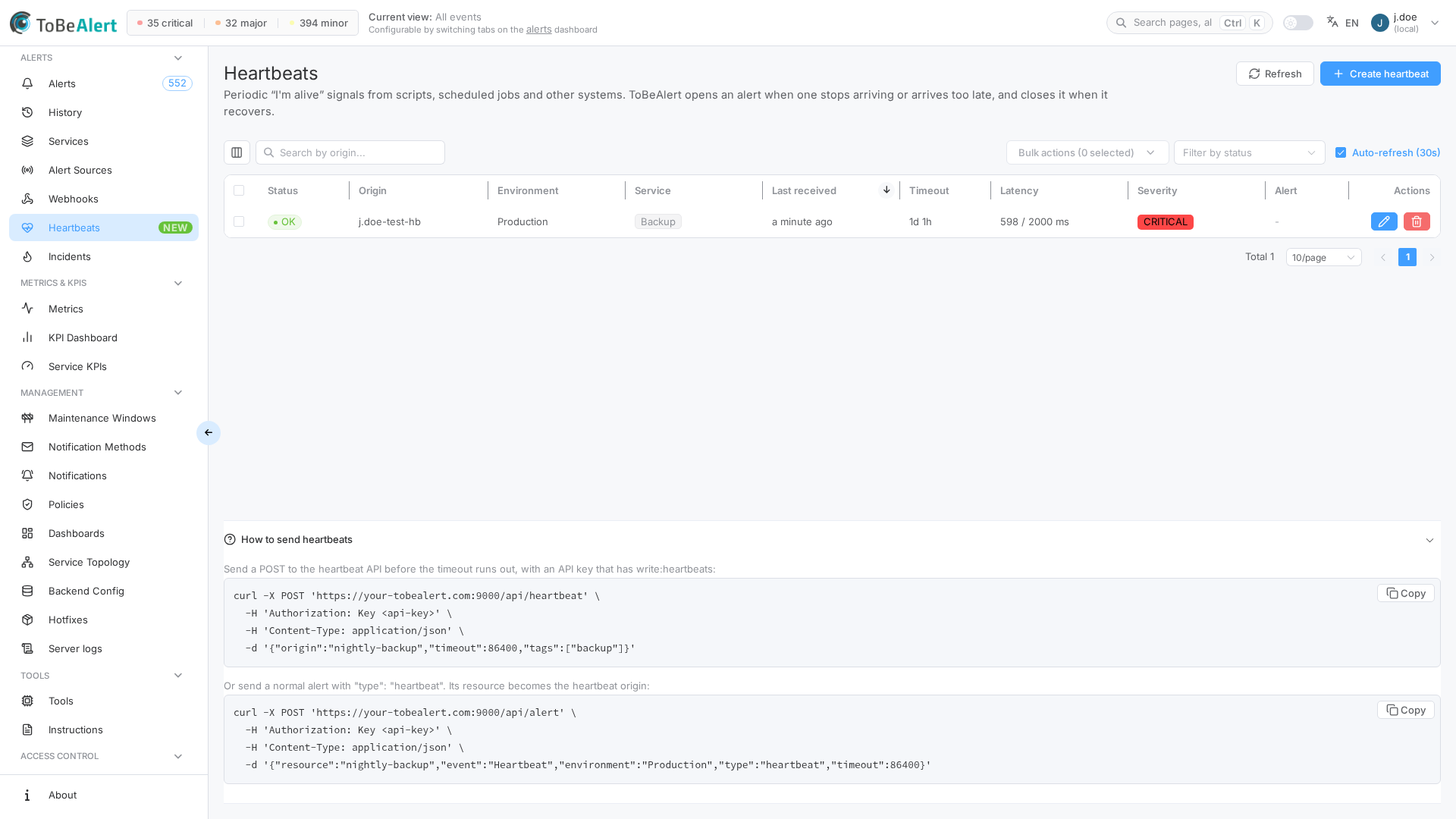
Below the table, How to send heartbeats expands ready-to-copy curl commands for your server (direct heartbeat and alert with "type": "heartbeat"), each with a Copy button.
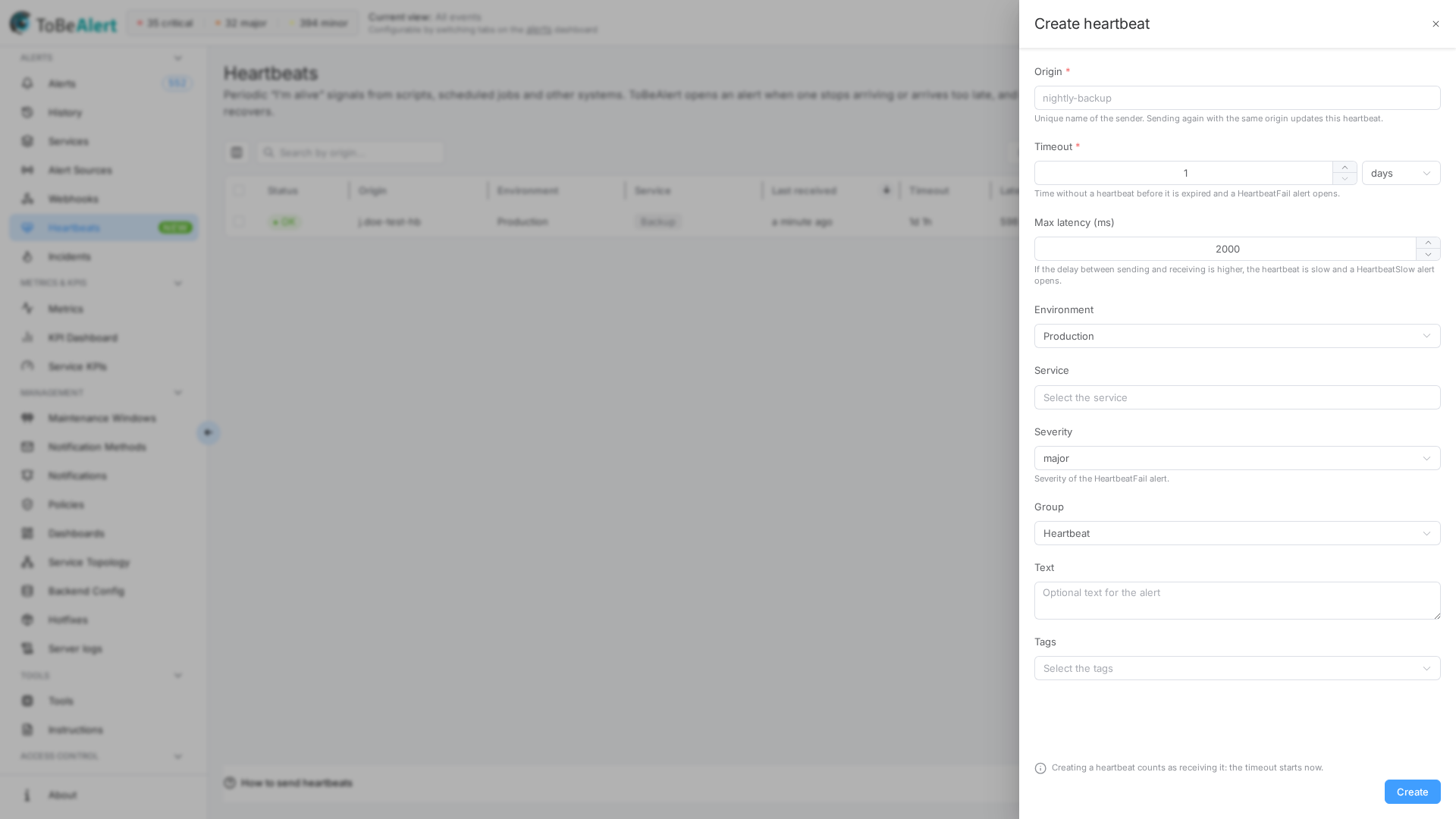
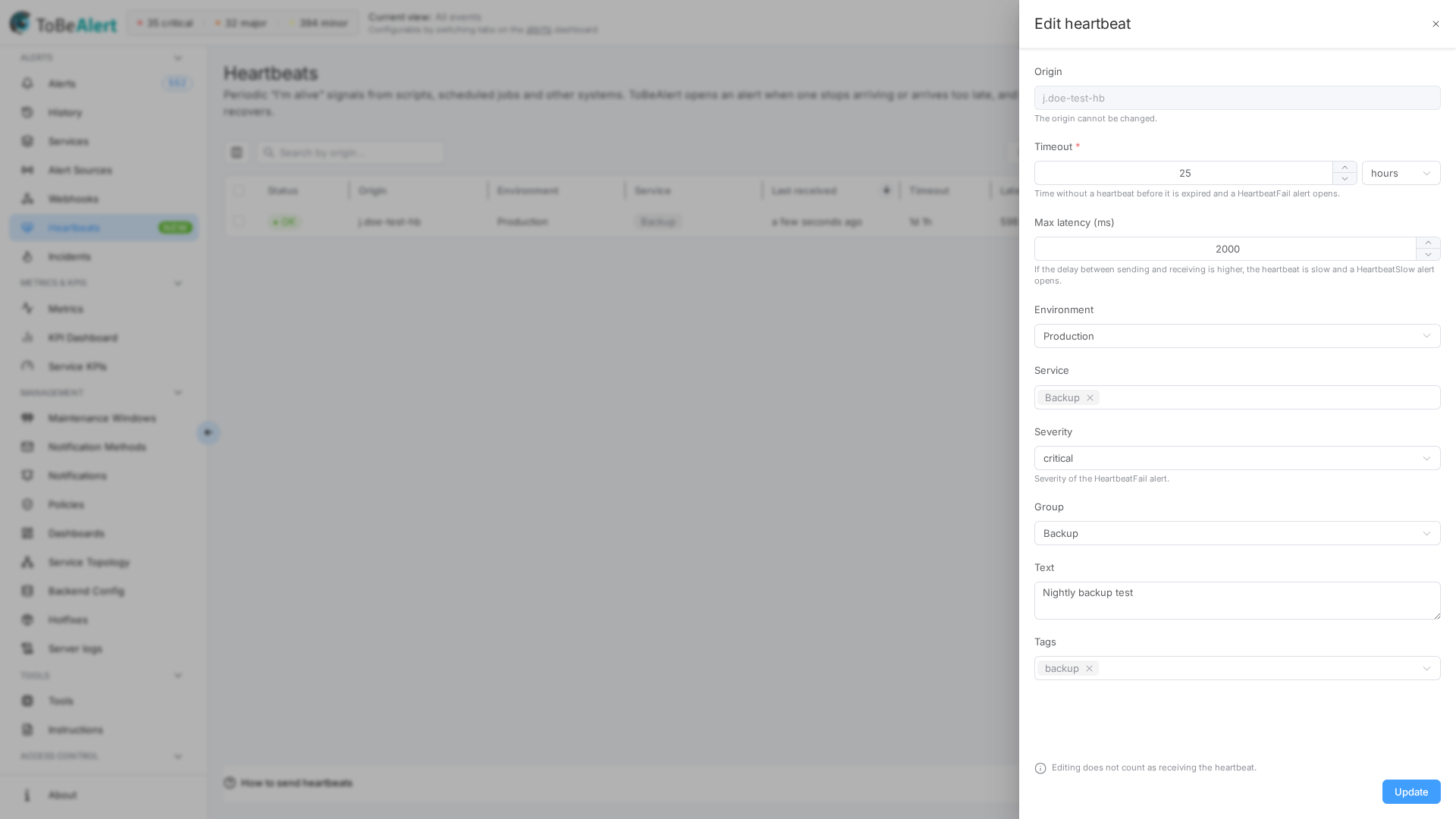
Create or edit a heartbeat
Most heartbeats are created automatically the first time a system sends one. You can also create one beforehand or adjust an existing one:
- Open Alerts → Heartbeats.
- Click Create heartbeat, or click a heartbeat's origin (or its edit button, or double-click the row) to open Edit heartbeat.
- Fill in the fields:
| Field | Description |
|---|---|
| Origin | Unique name of the sender. Sending again with the same origin updates this heartbeat. Required; it cannot be changed when editing |
| Timeout | Number plus unit (seconds, minutes, hours, days): time without a heartbeat before it is Expired and a HeartbeatFail alert opens. Default 1 day |
| Max latency (ms) | If the delay between sending and receiving is higher, the heartbeat is Slow and a HeartbeatSlow alert opens. Default 2000 |
| Environment | Environment of the alert (default Production) |
| Service | Services of the alert |
| Severity | Severity of the HeartbeatFail alert (default major) |
| Group | Group of the alert (default Heartbeat) |
| Text | Optional text for the alert; the origin is used when empty |
| Tags | Tags copied to the alert |
- Click Create or Update.
- Creating a heartbeat counts as receiving it: the timeout starts now. A heartbeat created from the page always shows a latency of 0, because only senders that include their creation time can measure it.
- Editing does not count as receiving the heartbeat: the time since the last receive is not reset.
Send a heartbeat
The monitored system sends the heartbeat to the ToBeAlert API with an API key that has the heartbeat write permission. The simplest call:
curl -X POST https://your-tobealert.com:9000/api/heartbeat \
  -H "Content-Type: application/json" \
  -H "Authorization: Key <api-key>" \
  -d '{
    "origin": "nightly-backup",
    "timeout": 90000,
    "environment": "Production",
    "service": ["Backup"],
    "severity": "critical",
    "text": "Nightly backup of the file server"
  }'
Here timeout is 25 hours: the backup runs every night, and one hour of margin avoids false alarms if a run takes longer.
Example: cron job
Send the heartbeat only when the job succeeds, so a failed or missing run ends in a HeartbeatFail alert:
# crontab -e  (runs every night at 02:00)
0 2 * * * /usr/local/bin/backup.sh && curl -fsS -X POST https://your-tobealert.com:9000/api/heartbeat -H "Content-Type: application/json" -H "Authorization: Key <api-key>" -d '{"origin": "nightly-backup", "timeout": 90000, "createTime": "'"$(date -u +\%Y-\%m-\%dT\%H:\%M:\%S.000Z)"'"}' > /dev/null
Sending createTime (the time the heartbeat was created, in UTC) lets ToBeAlert measure the latency and detect slow. In crontab, % must be escaped as \%.
Example: as an alert
Tools that can only send alerts can send heartbeats too. An alert sent to the alert API (or through a webhook) with "type": "heartbeat" is not stored as an alert: it is turned into a heartbeat whose origin is the alert's resource.
{
  "resource": "nightly-backup",
  "event": "Heartbeat",
  "type": "heartbeat",
  "environment": "Production",
  "service": ["Backup"],
  "timeout": 90000,
  "attributes": {
    "heartbeatSeverity": "critical"
  }
}
Alerts whose event is Heartbeat are converted as well. See Heartbeats API for every field.
Permissions
| Action | Permission |
|---|---|
| See the Heartbeats page and the heartbeat list (read only: no Create heartbeat, no edit or delete, no row selection) | read:heartbeats |
| Send, create, edit, and delete heartbeats | write:heartbeats |
| Full heartbeat administration | admin:heartbeats |
See Permissions reference. Ask your administrator if the page or its actions are not available.
Best practices
- One origin per job or system: use clear, stable names (
nightly-backup,edge-collector-madrid). Changing the origin creates a new heartbeat. - Timeout = interval + margin: a job that runs every 5 minutes can use a 15-minute timeout; a nightly job, 25 hours.
- Send on success only (
job && curl …) so a failed run is reported, not just a missing one. - Set the severity per heartbeat: a missing production backup deserves critical, a test job minor.
- Notify: create a notification rule for heartbeat alerts; without one, the alert only appears on the dashboard.
- Clean up: delete heartbeats of systems that no longer exist, or they will stay expired.