Checkmk integration
Route: /integrations (sidebar: Management → Integrations, type Checkmk)
A Checkmk integration reads, through the Checkmk REST API, the graphs of the service or host that raised an alert and shows them in the alert details. Alerts reach ToBeAlert through the Checkmk notification script; the integration only adds the graphs.
See also: Overview · Alert details drawer — Integration · Integrations API
Requirements
| Requirement | Details |
|---|---|
| Checkmk 2.2 or newer | The REST API serves graph data from Checkmk 2.2. On Checkmk 2.1 the integration connects (Test connection succeeds) but shows no graphs: the alert details show Checkmk 2.2 or newer is required for graphs |
| Network access | The ToBeAlert backend must reach the Checkmk site over HTTP(S) (https://<host>/<site>/check_mk/api/1.0). Proxies, firewalls and TLS certificates apply to the backend, not to your browser |
| Automation user | A Checkmk user with an automation secret that can see the monitored hosts (see below) |
Create the automation user in Checkmk
- In Checkmk open Setup → Users and click Add user.
- Give it an id (for example
tobealert) and, in the authentication options, choose Automation secret for machine accounts. Copy the secret: it is the value for Automation secret in ToBeAlert. - Make sure the user can see the hosts that send alerts. Checkmk only returns data for the hosts the user is allowed to see:
- the Guest user role sees all hosts and services read-only, or
- a Normal monitoring user in the same contact groups as the hosts (every host and service with graphs must be visible to this user).
- Save and activate the changes.
Without that visibility Checkmk answers host not found or no permission on the host, and the alert details show no graphs even though Test connection succeeds, because the connection test only checks the credentials.
Create the integration
- Open Management → Integrations and click Create integration.
- Fill in Name, choose Type = Checkmk and select the Alert source the notification script sends (default
checkmk). See Common fields. - Fill in the Checkmk fields.
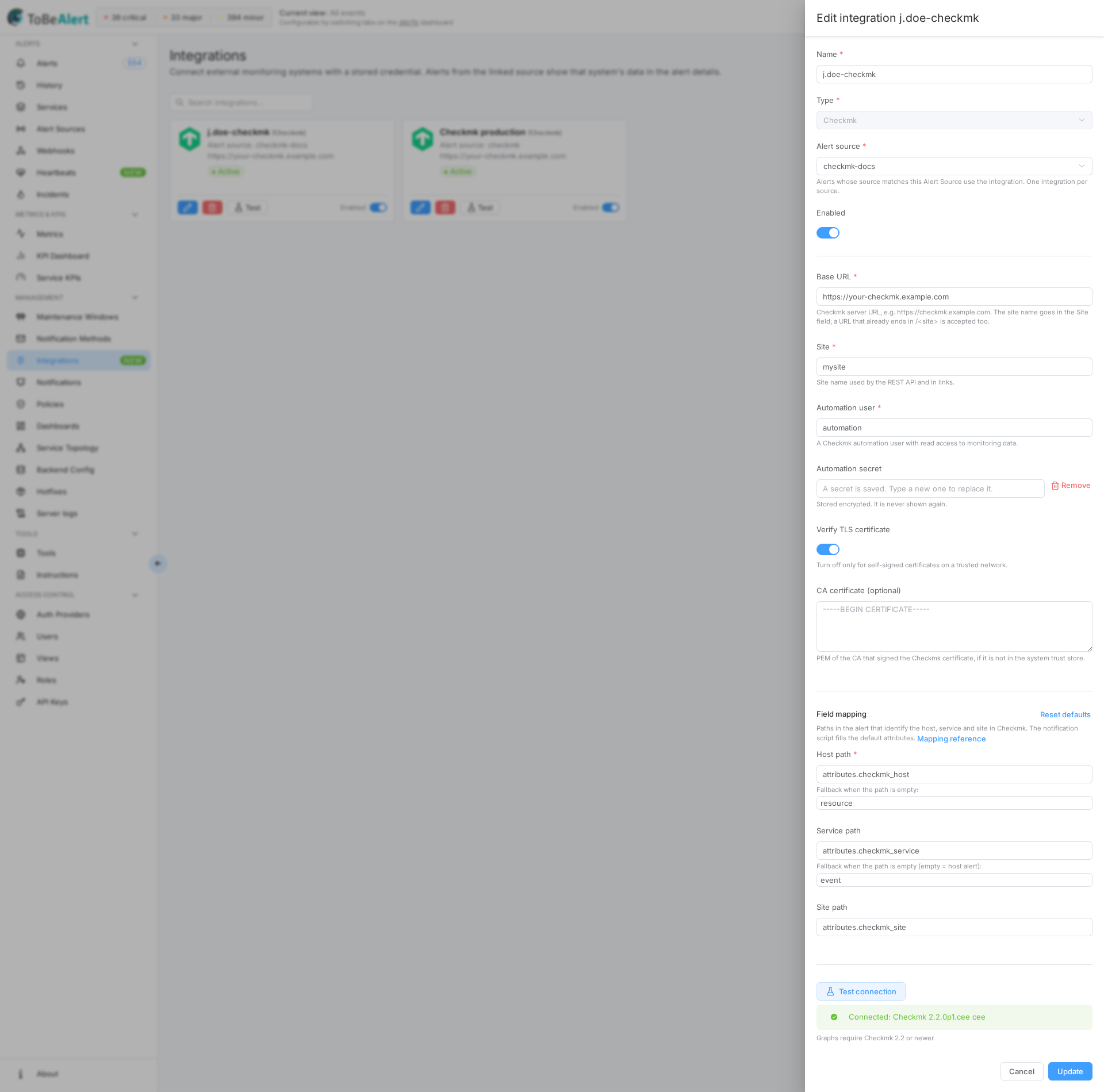
- Click Test connection. The drawer shows Connected: Checkmk <version> <edition> or Connection failed: ….
- Click Create.
Checkmk fields
| Field | Description |
|---|---|
| Base URL | Required. Scheme, host and port of the Checkmk server, without the API path: https://checkmk.example.com. The site name goes in Site; a URL that already ends in /<site> (https://checkmk.example.com/mysite) is accepted and not duplicated. ToBeAlert calls <Base URL>/<Site>/check_mk/api/1.0 |
| Site | Required. The Checkmk site name (mysite). Used in the API path and in the Open in Checkmk links. Only letters, digits, - and _ |
| Automation user | Required. The user id created above |
| Automation secret | Required when creating. Stored encrypted; it is never shown again. When editing, the placeholder reads A secret is saved. Type a new one to replace it.; leave it empty to keep the saved secret, or click Remove (undo with Keep saved secret) to delete it. A secret is saved but cannot be decrypted. Type it again. appears when the server secret key changed since the secret was saved |
| Verify TLS certificate | Default on. Turn off only for self-signed certificates on a trusted network |
| CA certificate (optional) | Shown while verification is on. Paste the PEM of the CA that signed the Checkmk certificate when it is not in the trust store of the ToBeAlert backend |
Field mapping
How the alert is matched to a Checkmk host and service. The defaults match the attributes the notification script sends:
| Mapping | Default | Fallback when the path is not in the alert |
|---|---|---|
| Host path | attributes.checkmk_host | resource |
| Service path | attributes.checkmk_service | event (empty = host alert) |
| Site path | attributes.checkmk_site | The Site field above |
An empty service means a host alert: the section shows the host metrics (for example round trip average and packet loss of the host check). The general rules (existing-but-empty path, fallback, warnings) are described in Overview — Field mapping. Reset defaults restores the three paths and the fallbacks.
Test connection
Test connection needs Base URL, Automation user and a secret; when editing an integration that already has a secret, the saved one is used. The button calls the Checkmk version endpoint and shows:
- Connected: Checkmk 2.2.0p1.cee cee — credentials and address are correct. On Checkmk 2.1 the connection succeeds but the alert details show the 2.2 warning.
- Connection failed: … — see Troubleshooting.
The Test button on the card does the same check with the stored configuration.
What the alert details show
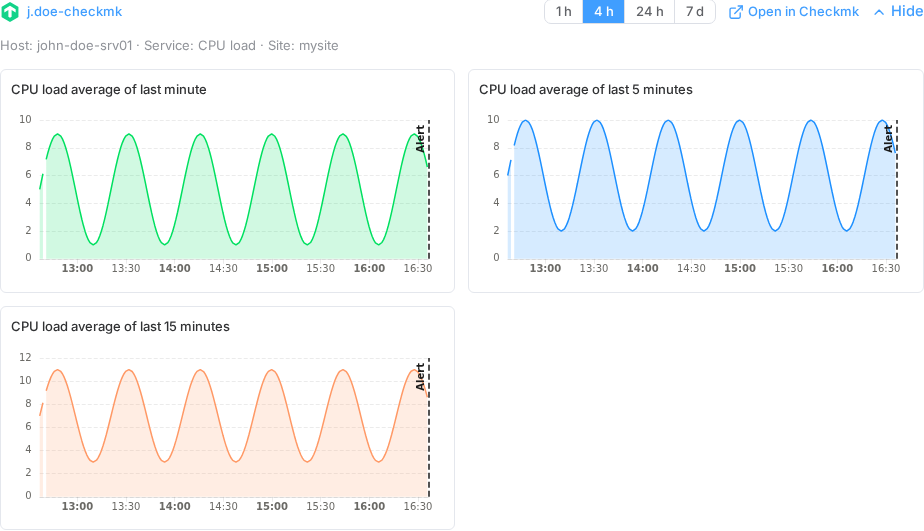
For an alert whose source is linked to the integration, the Integration section shows:
- All metrics of the service of the alert, or the host metrics when the alert is a host notification. One graph per metric (Checkmk does not report units, so metrics are not grouped as in Checkmk's own graphs). At most 16 metrics; beyond that the section warns Showing the first 16 of … metrics.
- The time window around the alert: 1 h, 4 h, 24 h or 7 d before the alert, and the same after it (up to now for open alerts). Windows up to 4 h show the maximum value of each step, longer windows the average.
- A dashed Alert mark at the creation time of the alert.
- Open in Checkmk: the host or service view of the Checkmk site.
- Checkmk names metrics in its performance data differently from the ids its graph API expects (
wait→io_wait,ESTABLISHED→tcp_established, …). ToBeAlert translates the common names; metrics it cannot translate are listed in a warning N metrics could not be graphed: … and the others are still shown.
Graph data is cached on the server for about one minute per alert and window, so reopening the same alert does not query Checkmk again immediately.
The same section is shown in Alerts → History: in the point-in-time details drawer and as the first block of the Summary tab of the per-alert timeline. It also works for alerts that housekeeping has already removed from the dashboard; the section then notes Graph around the alert time, from history and the window is centred on the creation time of the alert.
Troubleshooting
| Message | Cause | What to do |
|---|---|---|
| Connection failed: Checkmk rejected the credentials (401) | Wrong user or secret, or the user has no automation secret | Check Automation user and Automation secret (the automation secret, not the login password) |
| Could not reach the external system: Checkmk rejected the credentials (403) in the alert details, while Test connection succeeds | The automation user cannot see the host (Checkmk: no permission on the host … contact groups) | Give the user the Guest user role, or add it to the contact groups of the hosts |
| Host '…' not found in Checkmk | The host is not visible to the automation user, or the host name in the alert differs from the Checkmk host name | Fix the user permissions; check Host path and the value of attributes.checkmk_host in the alert |
| Service '…' on host '…' not found in Checkmk | The service description in the alert differs from the one in Checkmk | Check Service path; the notification script sends the exact service description |
| No metrics found for service '…' on host '…' | The service has no performance data (for example Uptime) | Nothing to graph; the warning is informational |
| Checkmk 2.2 or newer is required for graphs | The site runs Checkmk 2.1 or older | Upgrade Checkmk; the integration keeps working for the connection test |
| TLS error connecting to Checkmk at … | The certificate is not trusted by the backend | Paste the CA in CA certificate (optional), or turn off Verify TLS certificate on a trusted network |
| Could not connect to Checkmk at … / Checkmk at … did not answer in time | Network, port or proxy between the ToBeAlert backend and Checkmk | Check Base URL (scheme and port) and the reachability from the backend host |
| The alert does not identify a host in the external system: … | The mapped host path and its fallback are empty in the alert | Check Host path; alerts sent by the notification script always carry attributes.checkmk_host |
| The integration has no secret stored: enter the automation secret again | The secret was removed, or it is unreadable after a change of the server secret key | Edit the integration and enter the secret |
| N metrics could not be graphed: … | Those performance data names have no known Checkmk metric id | Informational; the remaining metrics are shown |
| No Integration section at all | The alert has no source, its source is not linked to an enabled integration, or you lack the read permission | Check the alert's Source and the Enabled switch of the integration |
Best practices
- Keep the notification script and the integration aligned: the Source parameter of the script and the Alert source of the integration must be the same value.
- Prefer a CA certificate over turning off TLS verification.
- Give the automation user the Guest user role unless you need to restrict the hosts it can see; then maintain the contact groups when you add hosts.
- Rotate the secret from Checkmk and ToBeAlert at the same time; Test on the card confirms the new value.