Configuration settings
Route: /backend-config (tab Configuration)
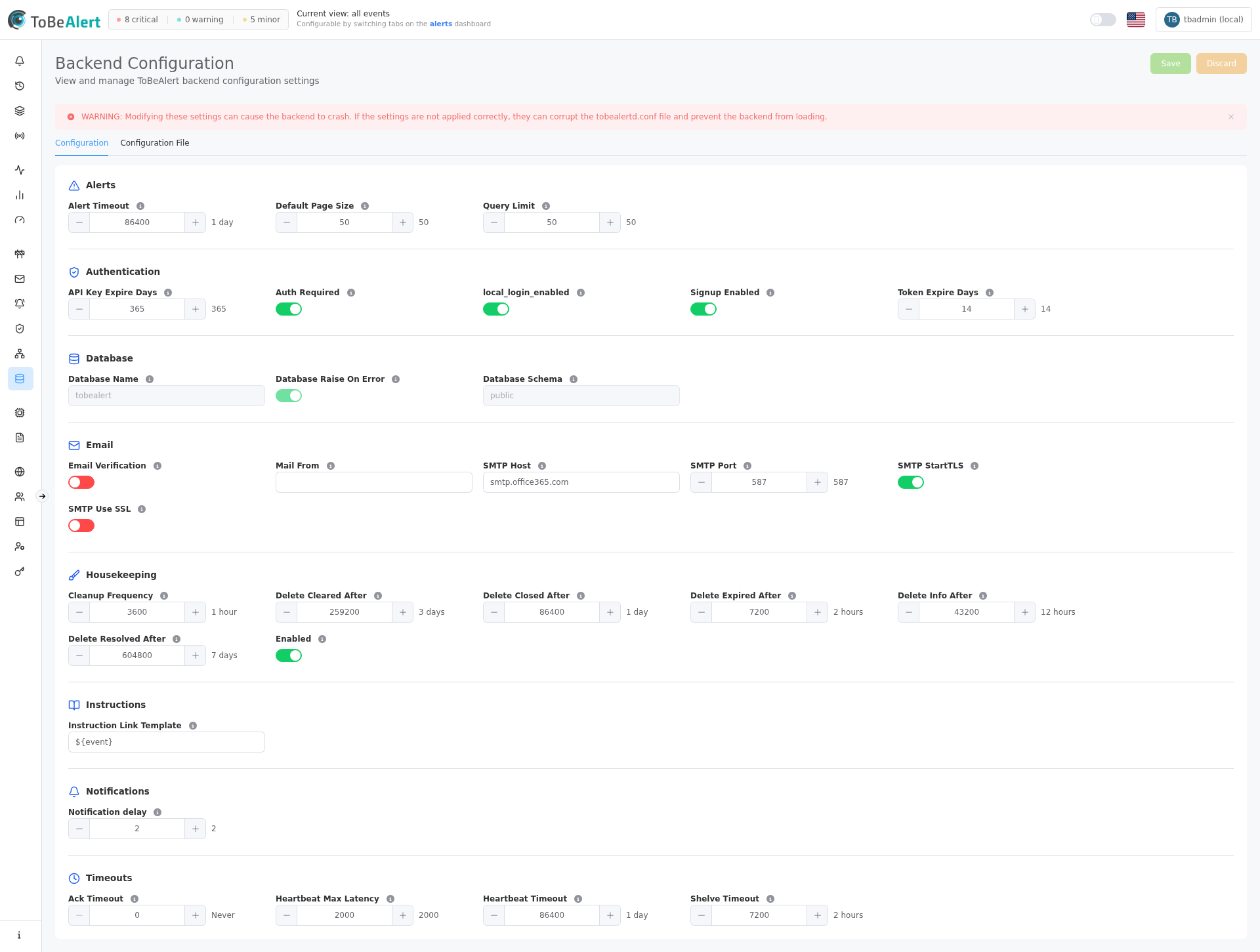
The Configuration tab lists global settings grouped by category. Each field shows a label, a short description under the label, and a control: toggle for yes/no values, number input for durations and counts (with unit hint), or text input for strings.
See also: Overview · Configuration file
Categories on the page
Settings appear in this order:
| Section header | Purpose | Editable in UI |
|---|---|---|
| Housekeeping / alert retention | Cleanup task and retention deletes | Yes |
| Timeouts | Auto-unack, auto-unshelve, heartbeats | Yes |
| Alerts | Default alert timeout and list sizes | Yes |
| Notifications | Delay plugin timing | Yes |
| Authentication | Login and tokens | Yes |
| App internal email | Signup verification, forgot password, etc. (not alerts) | Yes |
| Instructions | Runbook link template | Yes |
| Database | Database metadata | No (fields disabled) |
Change settings
- Open Management → Backend Config.
- Stay on the Configuration tab (default).
- Locate the category and field; read the description under the label.
- Adjust toggles, numbers, or text. Duration fields show a human-readable hint (for example 2 hours, Never when set to
0). Heartbeat max latency is in milliseconds. - Click Save when the button is enabled.
- Wait for Configuration updated successfully. If save fails, revert with Discard if needed.
Incorrect housekeeping intervals can delete alert history sooner than expected. Wrong authentication settings can lock out users. Invalid SMTP values break verification email, not necessarily notification methods which use their own SMTP configuration.
Housekeeping / alert retention
Controls the Celery run_housekeeping task: whether it runs, how often, and which alerts it deletes.
| Field | Control | Description |
|---|---|---|
| Housekeeping enabled | Toggle | Master switch. When off, run_housekeeping does not delete or process unshelve/unack. |
| Housekeeping interval | Number (seconds) | How often Celery Beat runs housekeeping (typical 3600). |
| Retain closed/expired | Number (seconds) | After last_receive_time, delete alerts with status closed or expired. 0 = never delete by this rule. |
| Retain informational | Number (seconds) | After last_receive_time, delete informational-severity alerts. 0 = never. |
DELETE_CLOSED_AFTER, DELETE_RESOLVED_AFTER, and DELETE_CLEARED_AFTER may still appear in older tobealertd.conf files. They are not applied by the cleanup task and are not shown in this UI. Closed alerts are deleted by the same rule as expired (DELETE_EXPIRED_AFTER / Retain closed/expired).
Changing the interval or retention affects how long historical alerts remain. Plan retention to match compliance needs before lowering values.
Alerts
| Field | Control | Description |
|---|---|---|
| Alert timeout | Number (seconds) | Default timeout when creating/updating alerts. After that time since last receive, the alert becomes expired (not deleted here). |
| Query limit (legacy) | Number | Exposed in config; runtime pagination uses Default page size. |
| Default page size | Number | Default number of items per page in paginated API lists |
Authentication
| Field | Control | Description |
|---|---|---|
| Auth required | Toggle | Require authentication to access the API and WebUI |
| Local login enabled | Toggle | Allow username/password login (when disabled, use LDAP/SAML or other configured providers) |
| Signup enabled | Toggle | Allow new users to register with local BasicAuth |
| Token expiry (days) | Number | Days before a session JWT expires |
| API key expiry (days) | Number | Days before an API key expires |
Disabling Auth required or Local login enabled without alternate login methods can block access. Coordinate with External auth providers configuration.
Email
App-internal mail only (signup verification, forgot password, and similar account emails). This SMTP is not used for alert notifications, notification rules, or notification methods — configure those separately. A backend restart may be needed for SMTP changes to take effect in the mailer.
| Field | Control | Description |
|---|---|---|
| Require signup verification | Toggle | Local users must confirm email before sign-in |
| Internal From address | Text | From address for verification / password-reset emails |
| SMTP host (internal mail) | Text | SMTP for app-internal mail only |
| SMTP port (internal mail) | Number | Port (for example 587) |
| STARTTLS (internal mail) | Toggle | STARTTLS on the internal SMTP |
| SSL (internal mail) | Toggle | Implicit SSL/TLS on the internal SMTP |
Database
Read-only display of database connection metadata. Fields are disabled — you cannot change them from this page.
| Field | Description |
|---|---|
| Database name | Name of the database |
| Database schema | Schema name |
| Raise on database error | Whether database errors raise exceptions |
Use Settings & environment variables for DATABASE_URL and related deployment settings.
Timeouts
| Field | Control | Description |
|---|---|---|
| Ack timeout | Number (seconds) | After ack, auto-unack after this period (0 = Never) |
| Shelve timeout | Number (seconds) | After shelve, auto-unshelve after this period (0 = disabled) |
| Heartbeat timeout | Number (seconds) | Seconds without receive before a heartbeat is marked expired |
| Heartbeat max latency | Number (milliseconds) | Maximum acceptable heartbeat latency before it is considered slow |
Shelve and acknowledge behavior is also visible on the alerts dashboard.
Notifications
| Field | Control | Description |
|---|---|---|
| Delay plugin delay | Number (minutes) | Minutes the delay plugin waits before the alert becomes delayed (then open) |
Works alongside notification rules; rules define when to send. Conf key: NOTIFICATION_DELAY (env loader may also accept DELAY_NOTIFICATION).
Instructions
| Field | Control | Description |
|---|---|---|
| Instruction link template | Text | Template for resolving which instruction file opens when an operator clicks Instructions on an alert |
Supports `${field}` and `${attributes.key}` placeholders, for example `${resource}_${attributes.namespace}_${event}`. See Instructions from alerts for runbook paths and wiki authoring.
Save and discard
| Action | When available | Result |
|---|---|---|
| Save | After any edit | Writes changed keys to the configuration file; success toast Configuration updated successfully |
| Discard | After any edit | Restores values from the last load/save; toast Changes discarded (restored last loaded state) |
If you navigate away with unsaved edits, the product warns you before leaving.
Best practices
- Document baseline values before changing retention or timeouts in production.
- Test login and API keys after changing Authentication fields.
- Do not rely on this page for secrets — SMTP passwords and database URLs belong in env vars or the config file via installation procedures.
- Align housekeeping with audit and alert history requirements.
- Use notification methods for alert email; tune the delay plugin only when you need that global delay.