Permissions reference
Route: /roles ( Permissions field in the create/edit drawer)
Every value in the Permissions multi-select is listed exactly as it appears in the UI. Higher levels generally include lower ones at runtime (for example write:alerts implies read access to alerts). The global admin permission grants broad access across the product.
See also: Overview · Creating and managing roles
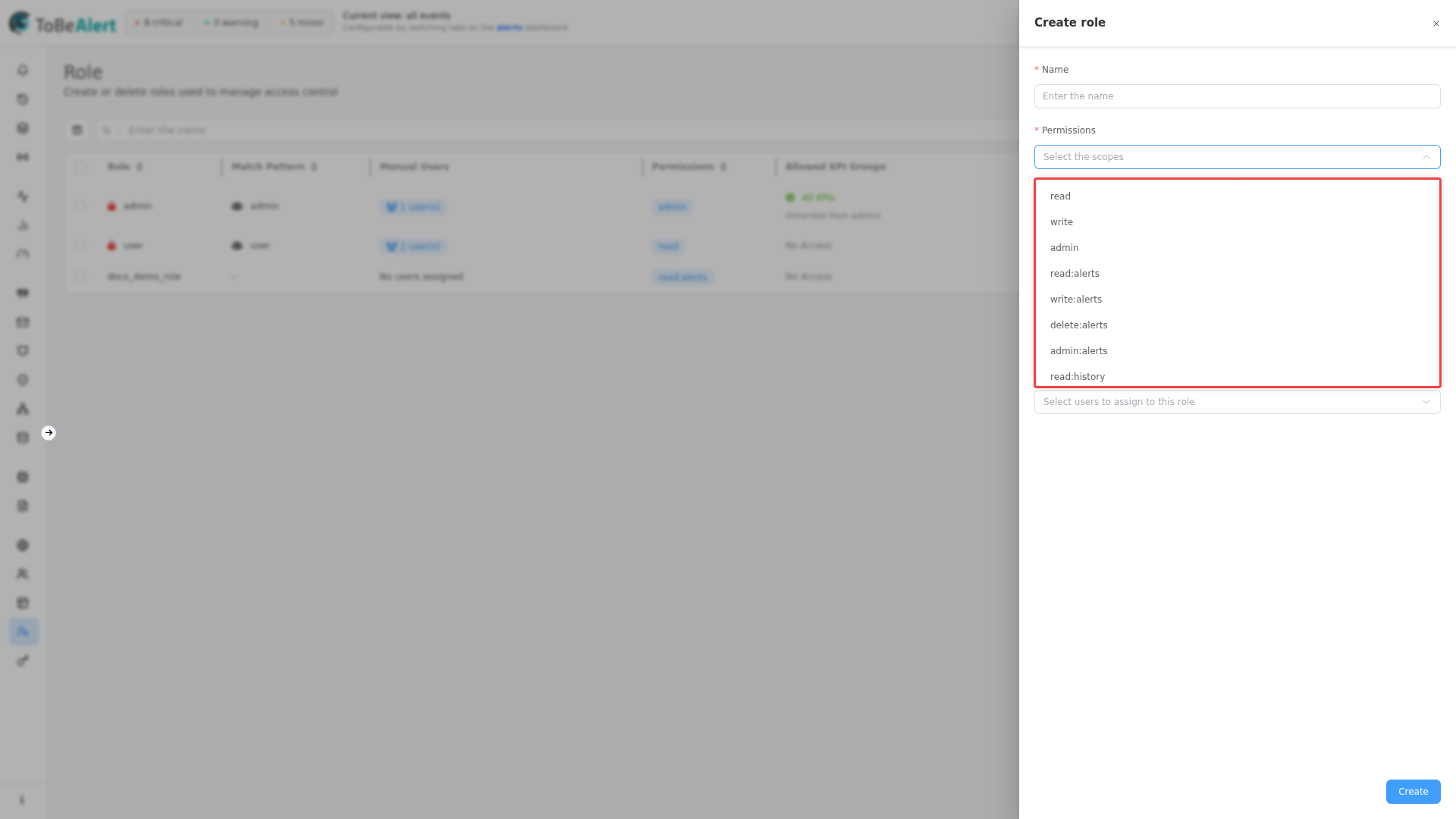
Permission levels
| Prefix | Typical meaning |
|---|---|
| read: | View data and open related screens |
| write: | Create and update (includes read) |
| delete: | Remove records where supported (often included in admin: for that resource) |
| admin: | Full control for that resource area |
Standalone entries:
| Permission | Description |
|---|---|
| admin | Global administrator; unlocks management areas and implies All KPIs for KPI-restricted views |
| read | Broad read access used with resource-specific permissions |
| write | Broad write access used with resource-specific permissions |
Alerts and history
Related: Alerts dashboard · Alert history
| Permission | Description |
|---|---|
| read:alerts | View alerts on the dashboard |
| write:alerts | Acknowledge, assign, comment, and update alerts |
| delete:alerts | Delete alerts |
| admin:alerts | Full alert administration |
| read:history | View alert history |
| write:history | Modify history entries |
| delete:history | Delete history entries |
| admin:history | Full history administration |
Services and KPIs
Related: Services
| Permission | Description |
|---|---|
| read:services | View the services catalog |
| write:services | Create and edit services |
| delete:services | Delete services |
| admin:services | Full services administration |
| read:kpis | View KPI dashboards (combine with Allowed KPI Groups on the role) |
| write:kpis | Edit KPI configuration |
| delete:kpis | Delete KPI-related data |
| admin:kpis | Full KPI administration |
Maintenance windows
Related: Maintenance windows
| Permission | Description |
|---|---|
| read:maintenance_windows | View maintenance windows |
| write:maintenance_windows | Create and edit windows |
| delete:maintenance_windows | Delete windows |
| admin:maintenance_windows | Full maintenance window administration |
Policies
Related: Policies
| Permission | Description |
|---|---|
| read:policies | View policies |
| write:policies | Create and edit policies |
| delete:policies | Delete policies |
| admin:policies | Full policy administration |
Incidents
| Permission | Description |
|---|---|
| read:incidents | View incidents |
| write:incidents | Create and update incidents |
| delete:incidents | Delete incidents |
| admin:incidents | Full incident administration |
Service topology
Related: Service topology
| Permission | Description |
|---|---|
| read:service_topologies | View topologies and policies |
| write:service_topologies | Create and edit topology assets |
| delete:service_topologies | Delete topology assets |
| admin:service_topologies | Full service topology administration |
Alert sources
Related: Alert sources
| Permission | Description |
|---|---|
| read:alert_sources | View alert sources |
| write:alert_sources | Create and edit sources |
| delete:alert_sources | Delete sources |
| admin:alert_sources | Full alert source administration |
Webhooks
Related: Custom webhooks
| Permission | Description |
|---|---|
| read:webhook_configs | View inbound webhook configurations |
| write:webhook_configs | Create and edit webhook configs |
| delete:webhook_configs | Delete webhook configs |
| admin:webhook_configs | Full webhook configuration administration |
Notifications
Related: Notifications
| Permission | Description |
|---|---|
| read:notifications | View notification rules, templates, and groups |
| write:notifications | Create and edit notification rules, templates, and groups |
| delete:notifications | Delete notification objects |
| admin:notifications | Full notification administration |
| write:notification_methods | Configure notification methods (SMTP, Telegram, etc.) |
Tools
Related: Tools
| Permission | Description |
|---|---|
| read:tool | View tools and definitions |
| write:tool | Run and configure tools |
| delete:tool | Delete tools |
| admin:tool | Full tool administration |
| execute:tool:<tool-id> | Run one specific tool (typed or selected in the Permissions field; custom entries allowed) |
Workflows
| Permission | Description |
|---|---|
| read:workflow | View workflows |
| write:workflow | Create and edit workflows |
| delete:workflow | Delete workflows |
| admin:workflow | Full workflow administration |
Metrics
| Permission | Description |
|---|---|
| read:metrics | View metrics screens |
API keys
Related: API Keys
| Permission | Description |
|---|---|
| write:keys | Create and rotate API keys |
| admin:keys | Full API key administration |
Heartbeats
| Permission | Description |
|---|---|
| read:heartbeats | View heartbeat monitors |
| write:heartbeats | Create and edit heartbeats |
| admin:heartbeats | Full heartbeat administration |
Instructions
Related: Instructions
| Permission | Description |
|---|---|
| write:instructions | Create and edit instruction pages |
| delete:instructions | Delete instructions |
| admin:instructions | Full instruction administration |
| write:share_instructions | Share instructions externally |
| admin:share_instructions | Administer shared instruction links |
Management and configuration
Related: Backend config
| Permission | Description |
|---|---|
| read:management | View management and system settings |
| admin:management | Change management and system settings |
| read:userinfo | View extended user profile information |
| read:oembed | View oEmbed-related settings |
| admin:service_status_config | Configure service status presentation |
| admin:dashboards_config | Configure dashboards |
Access Control screens
| Permission | What it enables |
|---|---|
| admin (global) | Access Control sidebar, including Roles (/roles), Users, Views, and API Keys |
User and role administration in the UI is gated by administrator access (global admin and related management permissions). The Permissions list does not include separate read:users or admin:roles entries.
Choosing permissions for common roles
| Role intent | Suggested starting permissions |
|---|---|
| Alert operator | read:alerts, write:alerts, read:history |
| Notification designer | read:notifications, write:notifications, write:notification_methods |
| Platform admin | admin or admin:management plus resource-specific admin: entries as needed |
| Tool runner | read:tool, write:tool, plus execute:tool:* for each approved tool |
Best practices
- Match UI labels exactly — when requesting access from an administrator, quote the permission string as shown in the Permissions dropdown.
- Prefer resource admin over global admin — use admin:alerts instead of admin when a team only manages alerts.
- Add execute:tool entries sparingly — grant per-tool execution only where write:tool is too broad.
- Pair KPI permissions with groups — always configure Allowed KPI Groups on the role when assigning read:kpis or write:kpis.
- Align API keys with roles — use the same permission strings on API Keys as on user roles for consistent automation access.