Permissions reference
Route: /roles ( Permissions field in the create/edit drawer)
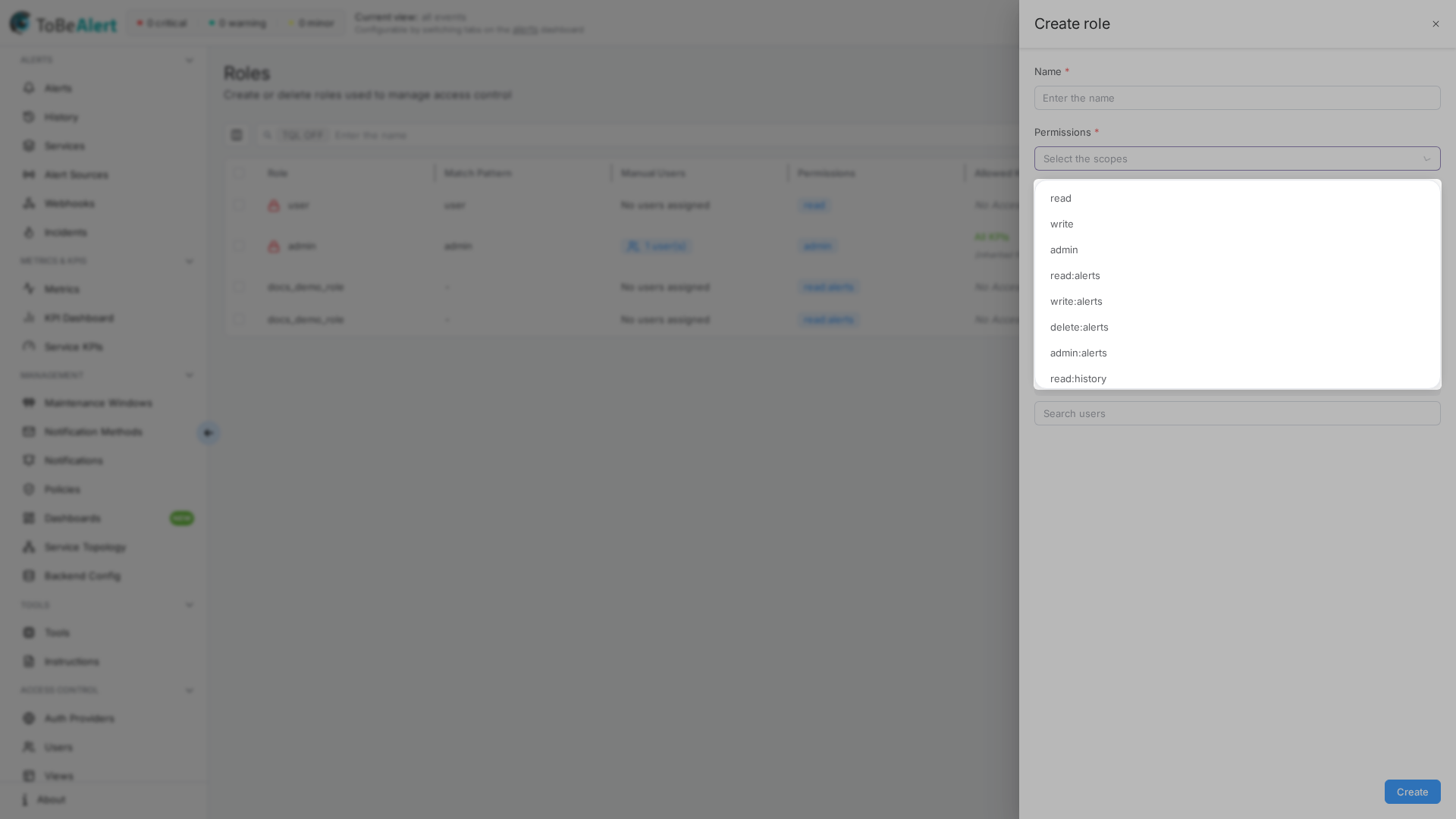
Every value in the Permissions multi-select is listed exactly as it appears in the UI. Higher levels generally include lower ones at runtime (for example write:alerts implies read access to alerts). The global admin permission grants broad access across the product.
See also: Overview · Creating and managing roles
Permission levels
| Prefix | Typical meaning |
|---|---|
| read: | View data and open related screens |
| write: | Create and update (includes read) |
| run: | Execute a resource on demand (policies: preview and apply). Not implied by write |
| delete: | Remove records where supported (often included in admin: for that resource) |
| admin: | Full control for that resource area (includes run where it exists) |
Standalone entries:
| Permission | Description |
|---|---|
| admin | Global administrator; unlocks management areas and implies All KPIs for KPI-restricted views |
| read | Broad read access used with resource-specific permissions |
| write | Broad write access used with resource-specific permissions |
Alerts and history
Related: Alerts dashboard · Alert history
| Permission | Description |
|---|---|
| read:alerts | View alerts on the dashboard |
| write:alerts | Acknowledge, assign, comment, and update alerts. You can add notes and edit only notes whose author is your login; an administrator cannot edit someone else's note. Deleting a note remains available to the author or an administrator. Also required alongside run:policies, execute:tool (and suffixes), and execute:policies (and suffixes) — admin:alerts or global admin satisfy this |
| delete:alerts | Delete alerts |
| admin:alerts | Full alert administration |
| read:history | View alert history |
| write:history | Delete history hits (history is not edited; write is the mutation scope) |
| admin:history | Full history administration |
Services and KPIs
Related: Services
| Permission | Description |
|---|---|
| read:services | View the services catalog |
| write:services | Create, edit, and delete services |
| admin:services | Full services administration |
| read:kpis | View the KPI list, dashboard (painted uptime), and KPI alerts (combine with Allowed KPI Groups). Does not include on-demand calculate |
| write:kpis | Create, edit, clone, and delete KPIs and KPI groups. Does not imply run |
| run:kpis | Calculate a KPI on demand (Calculate Uptime tab, Calculate). Not implied by write |
| admin:kpis | Full KPI administration (sees every KPI; inherits All; includes run) |
Maintenance windows
Related: Maintenance windows
| Permission | Description |
|---|---|
| read:maintenance_windows | View maintenance windows |
| write:maintenance_windows | Create, edit, and delete windows |
| admin:maintenance_windows | Full maintenance window administration |
Policies
Related: Policies · Creating a policy
| Permission | Description |
|---|---|
| read:policies | View the policies list, open a policy, and view per-policy execution history (drawer). Does not open the global All executions tab (/policies/history) |
| read:policies_history | View global policy execution history (/policies/history) for policies the user can already access (Permission / execute). Does not include read:policies_all_history |
| read:policies_all_history | View global execution history for all policies, including ones the user cannot open. Implies read:policies_history |
| write:policies | Create, edit, and delete policies |
| run:policies | Run a policy manually (preview and apply). Not implied by write:policies. Also requires write:alerts (admin:alerts or global admin count) |
| admin:policies | Full policy administration (includes run, read:policies_all_history, and deleting execution history) |
| execute:policies | Does not include execute:policies:* suffixes (same rule as execute:tool). Also requires write:alerts (admin:alerts or global admin count) |
| execute:policies:<suffix> | Access one specific policy whose Permission matches that suffix (view, edit, delete, and Run on demand). Typed or selected in the role Permissions field; catalog entries come from policies that set Permission. Independent of execute:tool: and of whether the policy runs a custom tool. Also requires write:alerts (admin:alerts or global admin count) |
When a policy leaves Permission empty, normal read: / write: / run: / admin:policies rules apply. When Permission is set, interactive access to that policy also requires the matching execute:policies:<suffix> (or admin:policies, or global admin). execute:policies without a suffix does not open that policy. Scheduled and on-alert automatic runs do not require the user’s custom execute scope.
run:policies, execute:policies, and execute:policies:<suffix> each also require write:alerts (admin:alerts or global admin satisfy this). That dependency does not turn run into a write scope — write:policies still does not imply run.
read:policies does not open /policies/history. Grant read:policies_history (accessible policies only) or read:policies_all_history (every run). admin:policies and global admin include all-history. Deleting history rows still requires admin:policies.
Regex Extractions on a policy (the Extractions tab in the policy drawer) are part of the policy itself. There are no separate *:extractions scopes — configuring them uses the same read:policies / write:policies (and related) permissions as the rest of the policy. See Creating a policy — Extractions.
Incidents
Related: Incidents
| Permission | Description |
|---|---|
| read:incidents | View incidents and their notes |
| write:incidents | Create, update, and delete incidents. Also edit or delete any incident note |
| write:incident_notes | Add notes; edit or delete only your own notes |
| admin:incidents | Full incident administration (includes notes) |
Service topology
Related: Service topology
| Permission | Description |
|---|---|
| read:service_topologies | View topologies and policies, and read the resource graph (parent/child resources) |
| write:service_topologies | Create, edit, and delete topologies and topology policies; add and remove resource graph relations |
| admin:service_topologies | Full service topology administration |
Without read:kpis, the KPI column and the KPI field in the drawer are hidden. Saving does not clear the stored KPI.
Alert sources
Related: Alert sources
| Permission | Description |
|---|---|
| read:alert_sources | View alert sources |
| write:alert_sources | Create, edit, and delete sources |
| admin:alert_sources | Full alert source administration |
Webhooks
Related: Webhook Configurations
| Permission | Description |
|---|---|
| read:webhook_configs | View inbound webhook configurations |
| write:webhook_configs | Create, edit, and delete inbound webhook configurations |
| admin:webhook_configs | Full webhook configuration administration |
Notifications
Related: Notifications
| Permission | Description |
|---|---|
| read:notifications | View Notifications and Notification methods in the sidebar (rules, templates, groups, and method configuration). Also opens All executions (/notifications/rules/history) and the per-rule execution history drawer. Without write:notification_methods, method secrets are masked. Unlike Policies/Tools, there is no separate read:notifications_history scope |
| write:notifications | Create, edit, and delete notification rules, templates, and groups |
| admin:notifications | Full notification administration (includes deleting rule-execution history rows) |
| write:notification_methods | Configure and delete notification methods (SMTP, Telegram, etc.) |
read:notifications opens both the rules list and global All executions. Deleting history rows still requires admin:notifications.
Tools
Related: Tools
| Permission | Description |
|---|---|
| read:tool | View the tools list, open the editor (read-only), and view per-tool execution history (editor / drawer). Does not open the global All executions tab (/tools/history) |
| read:tools_history | View global tool execution history (/tools/history) for tools the user can already access (Permission and author). Does not include read:tools_all_history |
| read:tools_all_history | View global execution history for all tools, including ones the user cannot open. Implies read:tools_history |
| write:tool | Create, edit, and delete tools. There is no delete:tool. Does not imply execute |
| execute:tool | Run a tool that has no Permission field (Try on Tools / the editor, Run on the alerts dashboard and alert drawer). Does not open tools that set Permission, and does not imply execute:tool:<suffix>. Not implied by write:tool. Also requires write:alerts (admin:alerts or global admin count). admin:tool and global admin include execute |
| admin:tool | Full tool administration (includes execute, read:tools_all_history, and deleting execution-history rows). Also grants every execute:tool:<suffix> |
| execute:tool:<suffix> | Exact scope for a tool that sets Permission. Required in addition to the endpoint scope (read to view, write to mutate, execute:tool to run). read:tool + execute:tool cover only tools with an empty Permission. write:tool and execute:tool do not imply any suffix. The author (createdBy) still sees and can open their own gated tool. admin:tool and global admin grant every suffix. Typed or selected in Permissions; catalog entries come from tools that set Permission. Independent of execute:policies: (neither unsuffixed execute is broader). Also requires write:alerts (admin:alerts or global admin count) |
When a tool leaves Permission empty, read:tool and execute:tool are enough to view and run it (plus write:alerts for the run). When Permission is set, interactive access also requires the matching execute:tool:<suffix> (or admin:tool or global admin). execute:tool does not include those suffixes. Automatic policy and workflow runs do not require the user’s execute:tool or custom execute suffix.
execute:tool and execute:tool:<suffix> each also require write:alerts (admin:alerts or global admin satisfy this). That dependency does not make execute a write scope — write:tool still does not imply execute.
read:tool does not open /tools/history. Grant read:tools_history (runs of tools the user can already access) or read:tools_all_history (every run, even for tools the user cannot open). admin:tool and global admin include all-history. Deleting history rows still requires admin:tool.
Workflows
| Permission | Description |
|---|---|
| read:workflow | View workflows |
| write:workflow | Create and edit workflows |
| delete:workflow | Delete workflows |
| admin:workflow | Full workflow administration |
Metrics
| Permission | Description |
|---|---|
| read:metrics | View metrics screens |
API keys
Related: API Keys
| Permission | Description |
|---|---|
| write:keys | View the API Keys sidebar item (/keys), list, view (copy / QR), create, edit, duplicate, enable/disable, and delete your own keys. There is no read:keys or delete:keys, and no resource-specific admin scope for keys |
Seeing all keys and assigning Owner to another user requires global admin (same as Users and Groups), because those actions also need visibility of other users. Without admin, a user with write sees and can mutate only their own keys; Owner is fixed to their login. A key cannot receive permission scopes the creator does not already hold.
Heartbeats
| Permission | Description |
|---|---|
| read:heartbeats | View heartbeat monitors |
| write:heartbeats | Create and edit heartbeats |
| admin:heartbeats | Full heartbeat administration |
Instructions
Related: Instructions
| Permission | Description |
|---|---|
| write:instructions | Create, edit, move, upload, and delete wiki pages, folders, and media. There is no delete:instructions |
| admin:instructions | Full instruction administration (includes write) |
| write:share_instructions | Create Share with link. Independent of write:instructions |
| admin:share_instructions | Administer shared instruction links |
There is no read:instructions. Any signed-in user can see Instructions in the sidebar (/instructions) and list or open wiki pages and media. Public shared links (/shared-instruction/…) do not require login. admin:instructions does not imply share; grant write:share_instructions or admin:share_instructions separately.
Management and configuration
Related: Backend config
| Permission | Description |
|---|---|
| read:management | View management and system settings |
| admin:management | Change management and system settings |
| read:userinfo | View extended user profile information |
| read:oembed | View oEmbed-related settings |
Dashboards
Related: Dashboards (Management)
| Permission | Description |
|---|---|
| read:dashboards_config | View the Dashboards sidebar item (/dashboards), list all dashboard configs, and open non-public dashboards |
| write:dashboards_config | Create, edit, duplicate, and delete dashboards. There is no delete:dashboards_config. Includes read:dashboards_config |
| admin:dashboards_config | Full dashboard administration (includes write and read) |
Public dashboards can be listed in the filtered catalog and opened without read:dashboards_config (GET is optional). Opening a private dashboard by id without read returns 403. Do not use dashboards_config for playlists.
Playlists
| Permission | Description |
|---|---|
| read:playlists_config | See the Playlists button on Dashboards, list playlists, and play authenticated routes (/playlists, /playlists/:id/play) |
| write:playlists_config | Create, edit, duplicate, and delete playlists. There is no delete:playlists_config. Includes read:playlists_config |
| admin:playlists_config | Full playlist administration (includes write and read) |
Independent of dashboards_config. The public player (/playlist/:slug) needs no playlist scope when the playlist is public (every dashboard in it is public). A private playlist without read:playlists_config returns 403.
Access Control screens
| Permission | What it enables |
|---|---|
| admin (global) | Access Control sidebar, including Roles (/roles), Users, Groups, and Views. API Keys (/keys): write:keys for your own keys; global admin to see all keys and assign Owner (same as Users and Groups) |
User and role administration in the UI is gated by administrator access (global admin and related management permissions). The Permissions list does not include separate read:users or admin:roles entries.
Choosing permissions for common roles
| Role intent | Suggested starting permissions |
|---|---|
| Alert operator | read:alerts, write:alerts, read:history |
| Dashboard viewer | read:dashboards_config (use write:dashboards_config to create, edit, duplicate, or delete) |
| Playlist viewer | read:playlists_config (public player /playlist/:slug needs no scope when the playlist is public) |
| Playlist editor | write:playlists_config (use admin:playlists_config for full playlist administration; independent of dashboard write/read) |
| Notification designer | read:notifications, write:notifications, write:notification_methods (read:notifications already includes All executions; use admin:notifications to delete history rows) |
| Platform admin | admin or admin:management plus resource-specific admin: entries as needed |
| Tool runner | write:alerts, read:tool, and execute:tool for tools with empty Permission; plus the exact execute:tool:* suffix for each approved Permission-gated tool. Add read:tools_history (or read:tools_all_history) for All executions |
| Instruction author | write:instructions (add write:share_instructions to share links) |
| Policy operator (scoped) | write:alerts, read:policies, write:policies, run:policies, plus execute:policies:* for each approved policy Permission. Add read:policies_history (or read:policies_all_history) for All executions |
| API key operator | write:keys (own keys only; use global admin for all keys and to assign Owner, same as Users and Groups) |
Best practices
- Match UI labels exactly — when requesting access from an administrator, quote the permission string as shown in the Permissions dropdown.
- Prefer resource admin over global admin — use admin:alerts instead of admin when a team only manages alerts.
- Do not treat execute:tool or execute:policies as a catch-all — neither includes execute:: suffixes. Grant the exact suffix (or admin:tool / admin:policies / admin) for each Permission-gated entity. A tool’s author still sees their own gated tool. run:policies is still the manual Run scope and is independent of those execute entries — but run:policies, execute:tool / execute:tool:, and execute:policies / execute:policies: each also need write:alerts (
admin:alertsor global admin count). - Pair KPI permissions with groups — set Allowed KPI Groups to All (Full Access) or named groups when assigning read:kpis, write:kpis, or run:kpis. Empty still allows KPIs with no group. Grant run:kpis separately from write when operators must calculate on demand.
- Align API keys with roles — use the same permission strings on API Keys as on user roles for consistent automation access.
- Copy policy Permission into roles — after setting Permission on a policy, add the same
execute:policies:<suffix>value to the roles that should manage or Run that policy.